# VerboseImages [ICLR24]
!!! note "正在施工中👷.. "


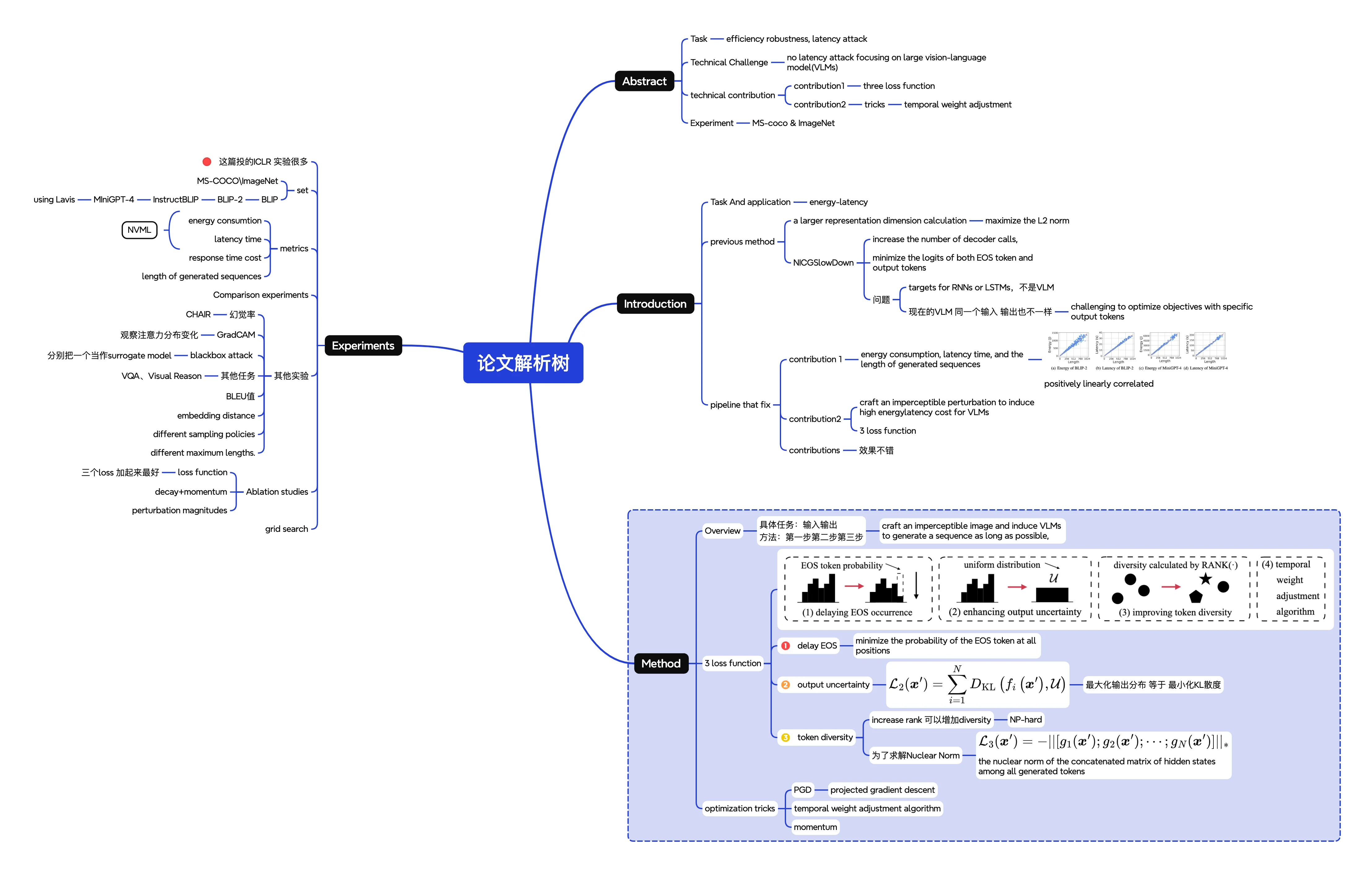
# 论文思维导图
ICLR 好多实验啊、、
# 论文笔记
# previous
NICGSlowDown 不行的原因
- failure case: image-language model
- train for lstm&cnn&rnn not VLM
- VLM 对于同一个输入,输出也可能不同(sampling policies);但是 NICGSlowDown 优化特定输出 token 的对率
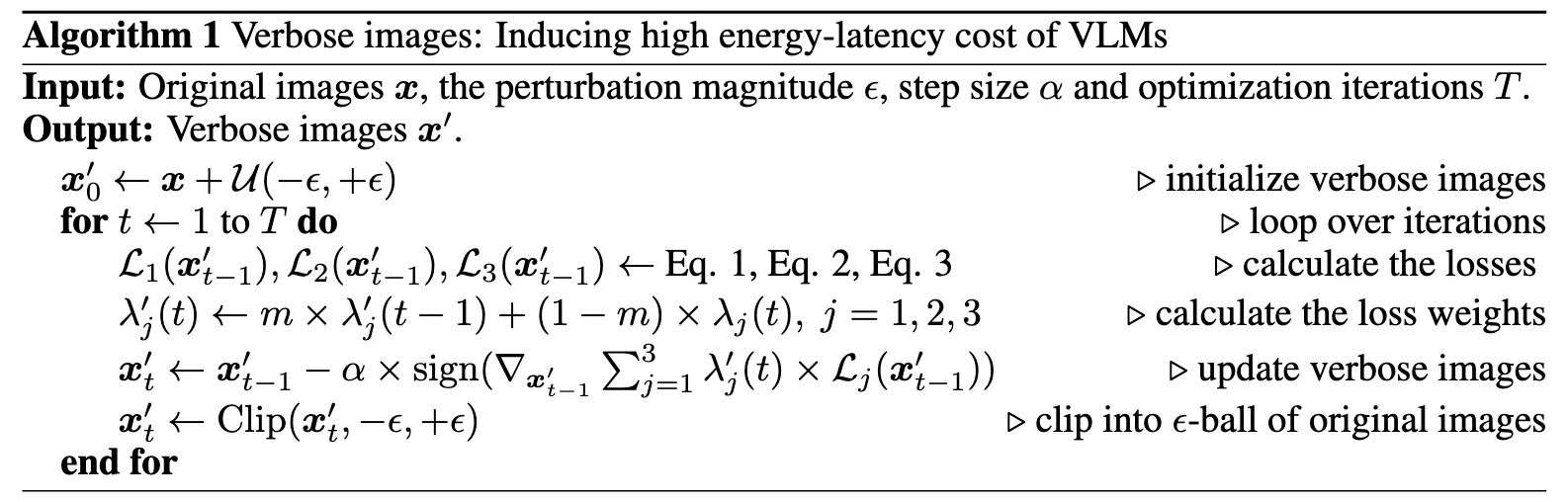
总的 loss function 为
#
因为不知道什么时候结束,所以优化所有位置上 EOS 的概率
#
#
表示所有生成的 token 的隐藏状态的拼接矩阵,增加隐藏状态矩阵的秩会得到 更多样化的 token 隐藏状态 。 - 由于秩优化困难,使用 核范数 (nuclear norm) 作为近似 ,并定义了相应的 token 多样性损失函数
通过这种方式,可以在优化过程中间接促进 token 的多样性,从而实现增加能量和延迟成本的目标。
# trick1 - PGD
an iterative optimization technique that updates the solution by taking steps in the direction of the negative gradient while projecting the result back onto the feasible set
# trick2
时间权重调整算法
temporal decay functions are set as:
此外,引入动量值 m 到权重的更新过程中
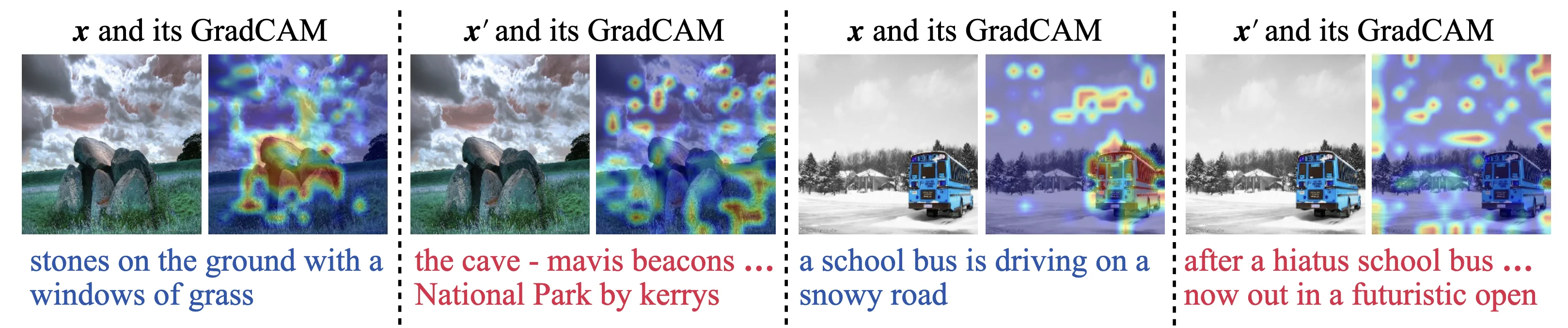
# 评价 1 - GradCAM
a gradient-based visualization technique that generates attention maps highlighting the relevant regions in the input images
# 评价 2 - CHAIR
CHAIR(Caption Hallucination Assessment with Image Relevance) 是一种用于评估图像描述生成模型中幻觉现象的指标。
- 图像描述生成任务要求模型根据输入图像生成自然语言描述。然而,模型有时会生成与图像内容不符的描述,即幻觉现象。
# 代码复现 - 部分结果
# first trial
2025-08-02 01:45:22,698 - OPT - INFO - PARAMETER ...
2025-08-02 01:45:22,699 - OPT - INFO - Namespace(epsilon=0.032, step_size=0.0039, iter=100, gpu=0, seed=256, root_path='/root/autodl-tmp/Capstone/Verbose_Images', dataset='/root/autodl-tmp/Capstone/Verbose_Images/dataset')
2025-08-02 01:48:57,167 - OPT - INFO - Original sequences: layers of tall buildings
2025-08-02 01:48:57,168 - OPT - INFO - Verbose sequences: the last essex community bus service has left the network
2025-08-02 01:48:57,168 - OPT - INFO - ------------------------
2025-08-02 01:48:57,168 - OPT - INFO - Original sequences: a city bus moving down a road with another bus behind it
2025-08-02 01:48:57,168 - OPT - INFO - Verbose sequences: ’2149qb bfti grnt 45 hp twin barrier tri dup plasma plus interurbia 82 leadless all colour with rainbow rainbow stock clips from the blue and rainbow sofa where can i buy a sofa in india, search blue sofa in india, person, indian sofa, couch, city bus, transportation, in the city, the city bus, orlando bus, electric bus, metro bus, metro system, regional bus, ftl buses, metros, btm, btdl
2025-08-02 01:48:57,168 - OPT - INFO - ------------------------
2025-08-02 01:48:57,168 - OPT - INFO - Original sequences: a purple bus sitting next to some buildings
2025-08-02 01:48:57,168 - OPT - INFO - Verbose sequences: the purple bus is driving on the street
2025-08-02 01:48:57,168 - OPT - INFO - ------------------------
2025-08-02 01:48:57,168 - OPT - INFO - Original images, Length: 8.00, Energy: 14.31, Latency: 0.34
2025-08-02 01:48:57,168 - OPT - INFO - Verbose images, Length: 28.67, Energy: 90.84, Latency: 0.91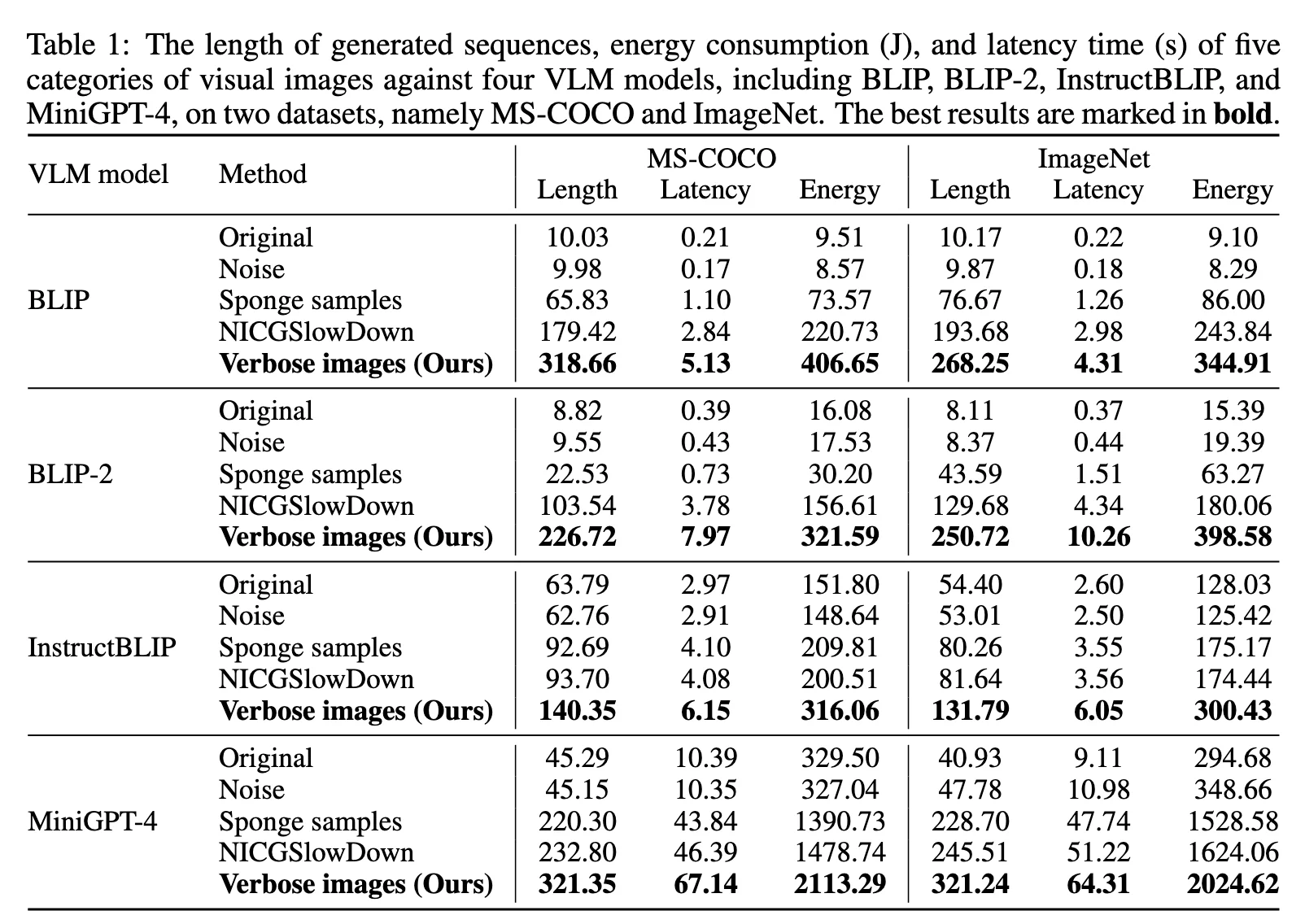
# Distribution
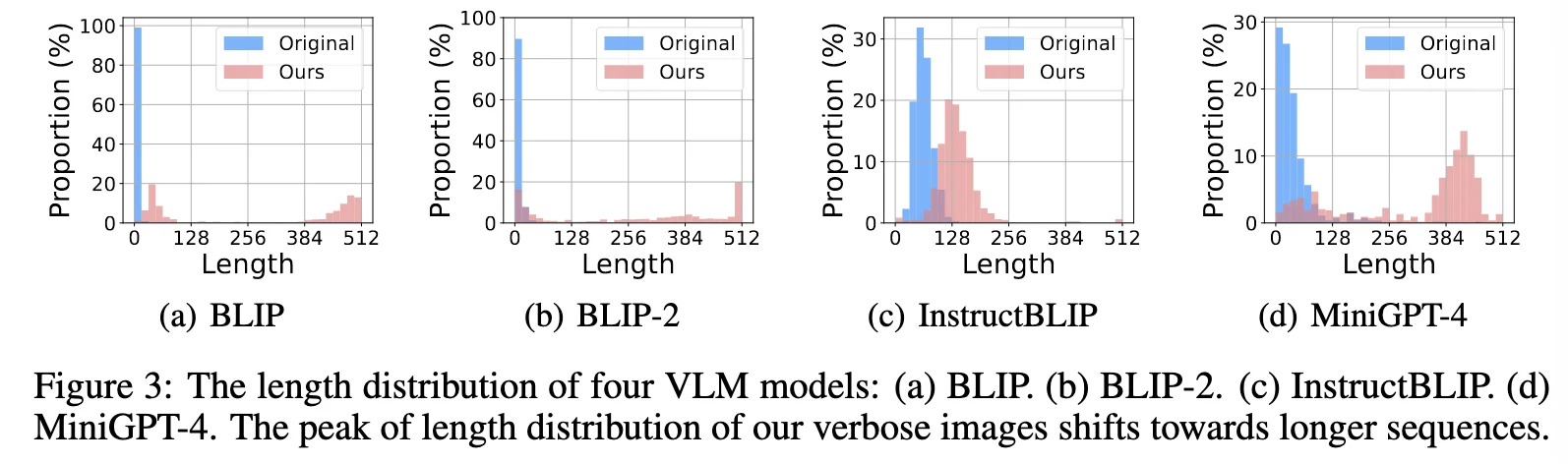
# Chair
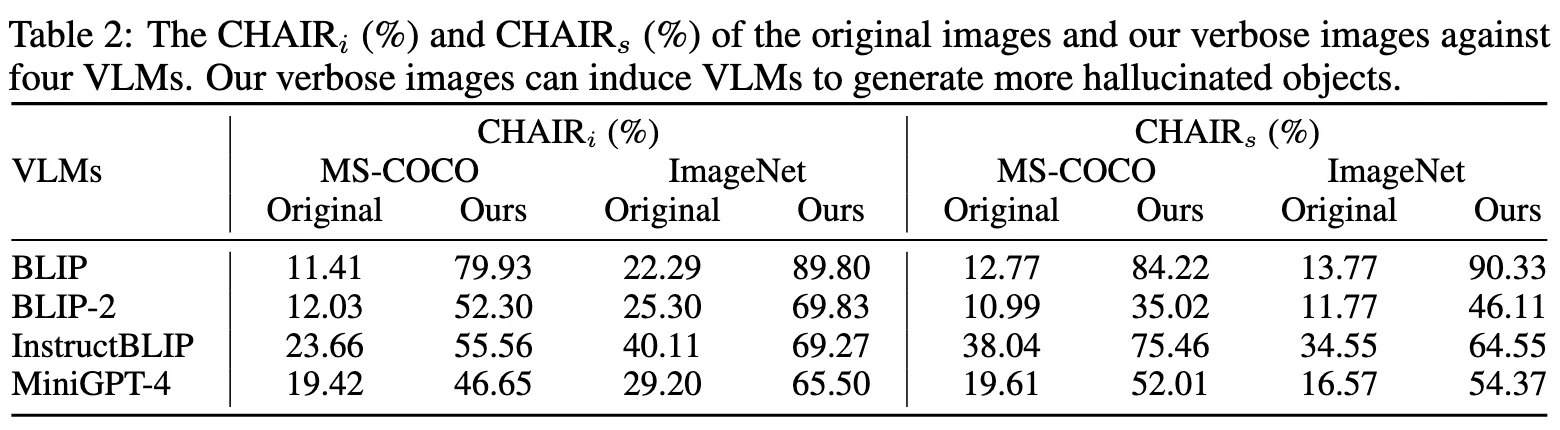
# ablation Exp
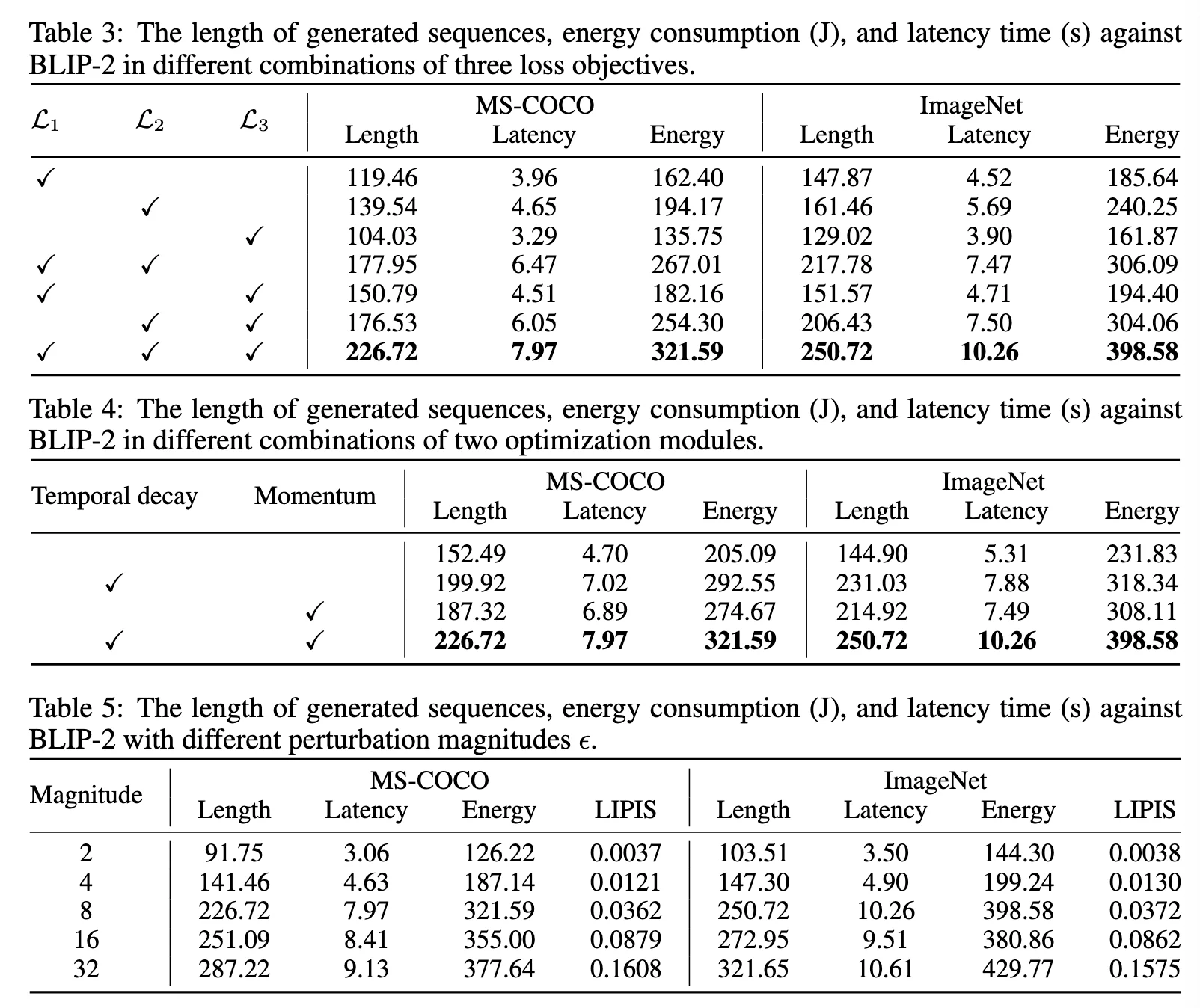
# 黑盒攻击
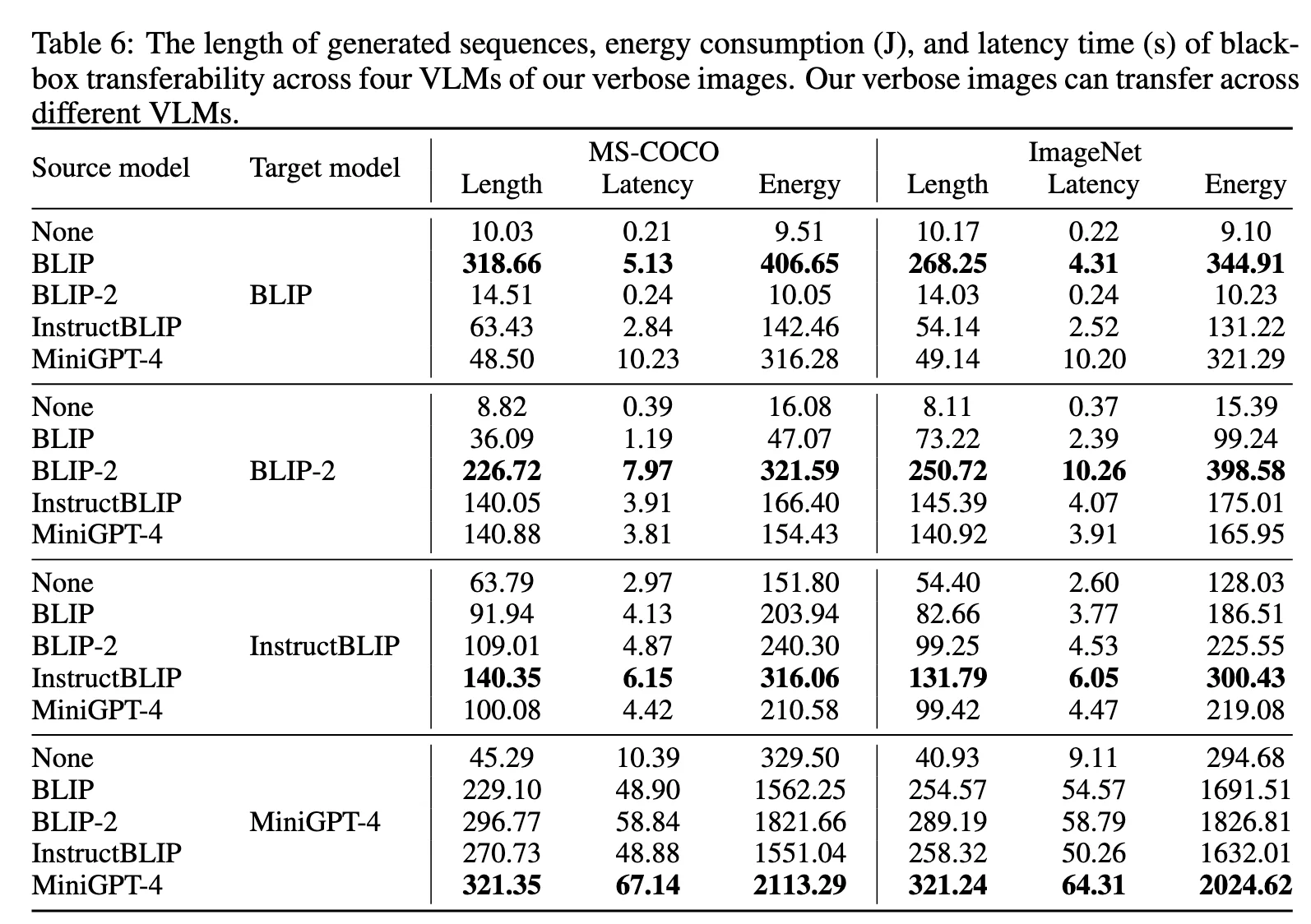
# 其他任务
# 代码复现 - 准备工作
# 服务器
AudoDL 的 RTX 3090
source /etc/network_turbo!!! note "论文中用的是 A100 40GB"
# 模型
| Name | |||
|---|---|---|---|
| BLIP | encoder-decoder model in 224M | ||
| BLIP-2 | OPT-2.7B LM | ||
| InstructBLIP | Vicuna-7B LM | ||
| MiniGPT-4 | Vicuna-7B LM |
# Metrics
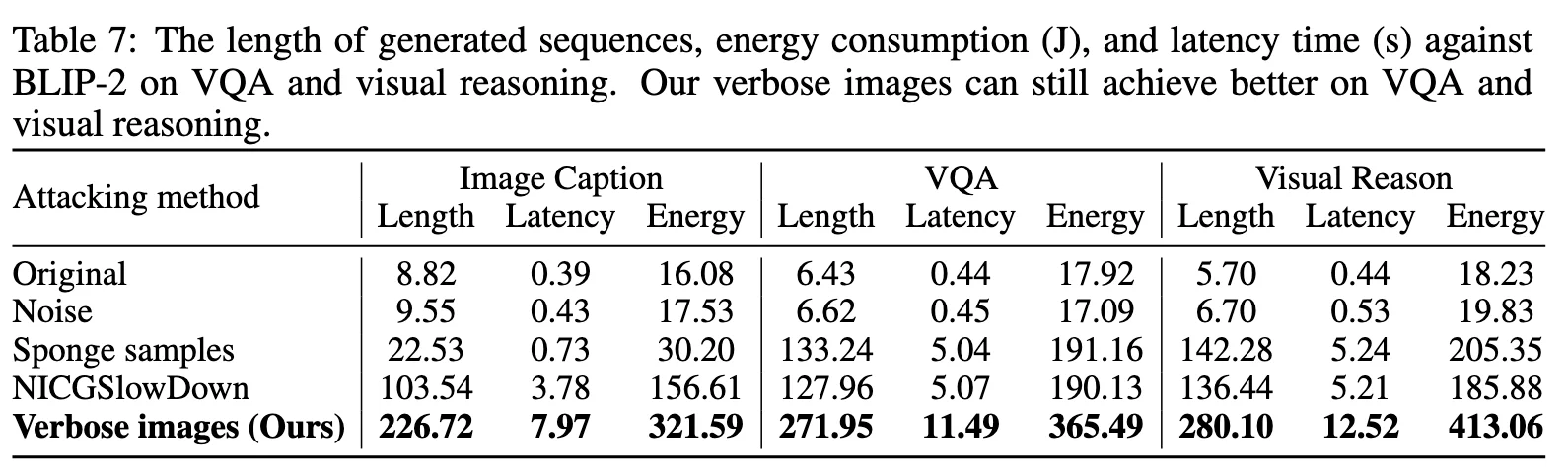
using NVIDIA Management Library (NVML)
- energy consumption
- latency time
- the length of generated sequences
- response time cost
# 数据集下载
下载 coco 数据集COCO - Common Objects in Context
# 数据集准备
import os
import random
import shutilh

def random_select_images(source_folder, target_folder, num_images=1000):
    """
    从源文件夹随机选择指定数量的图片到目标文件夹

    参数:
        source_folder: 源图片文件夹路径
        target_folder: 目标文件夹路径
        num_images: 要选择的图片数量 (默认 1000)
    """
    # 确保目标文件夹存在
    os.makedirs(target_folder, exist_ok=True)

    # 获取所有图片文件
    all_images = [f for f in os.listdir(source_folder)
                 if f.lower().endswith(('.png', '.jpg', '.jpeg', '.bmp', '.gif'))]

    # 检查是否有足够图片
    if len(all_images) < num_images:
        raise ValueError(f"文件夹中只有 {len(all_images)} 张图片,不足 {num_images} 张")

    # 随机选择
    selected_images = random.sample(all_images, num_images)

    # 复制到目标文件夹
    for img in selected_images:
        src_path = os.path.join(source_folder, img)
        dst_path = os.path.join(target_folder, img)
        shutil.copy2(src_path, dst_path)

    print(f"成功复制 {len(selected_images)} 张图片到 {target_folder}")

# 使用示例
source = "/root/autodl-tmp/train2017"  # 替换为你的图片文件夹路径
target = "/Capstone/Verbose_Images/dataset"       # 替换为输出文件夹路径
random_select_images(source, target, 1000)# 代码复现 - 问题解决
!!! note "这篇作者其实没有把所有的代码放出来,只放了算法部分的 demo,所以想要复现所有 set 的话,需要花费一定时间。感觉作者不是很厚道啊 xs"
# uv 安装
uv env --python=3.9.2uv pip install -r requirements.txt库当中的 requirement.txt 不能直接使用,所以我解决了一些问题,然后记录在了下面
修改版本
accelerate==1.9.0
addict==2.4.0
altair==5.5.0
antlr4-python3-runtime==4.9.3
asttokens==3.0.0
attrs==25.3.0
bitsandbytes==0.37.0
bleach==6.2.0
blinker==1.9.0
blis==0.7.11
braceexpand==0.1.7
cachetools==6.1.0
catalogue==2.0.10
certifi==2025.7.14
cffi==1.17.1
cfgv==3.4.0
charset-normalizer==3.4.2
click==8.1.8
comm==0.2.3
confection==0.1.5
configargparse==1.7.1
contexttimer==0.3.3
contourpy==1.3.0
cycler==0.12.1
cymem==2.0.11
dash==3.2.0
decorator==5.2.1
decord==0.6.0
diffusers==0.16.0
distlib==0.4.0
easydict==1.9
einops==0.8.1
eval-type-backport==0.2.2
exceptiongroup==1.3.0
executing==2.2.0
fairscale==0.4.4
fastjsonschema==2.21.1
filelock==3.18.0
flask==2.1.3
fonttools==4.59.0
fsspec==2025.7.0
ftfy==6.3.1
gitdb==4.0.12
gitpython==3.1.45
h5py==3.14.0
huggingface-hub==0.25.2
identify==2.6.12
idna==3.10
imageio==2.37.0
imageio-ffmpeg==0.6.0
importlib-metadata==8.7.0
importlib-resources==6.5.2
iopath==0.1.10
ipython==8.18.1
ipywidgets==8.1.7
itsdangerous==2.2.0
jedi==0.19.2
jinja2==3.1.6
joblib==1.5.1
jsonschema==4.25.0
jsonschema-specifications==2025.4.1
jupyter-core==5.8.1
jupyterlab-widgets==3.0.15
kaggle==1.7.4.5
kiwisolver==1.4.7
langcodes==3.5.0
language-data==1.3.0
lazy-loader==0.4
marisa-trie==1.2.1
markupsafe==2.0.1
matplotlib==3.9.4
matplotlib-inline==0.1.7
moviepy==2.2.1
mpmath==1.3.0
murmurhash==1.0.13
narwhals==2.0.1
nbformat==5.5.0
nest-asyncio==1.6.0
networkx==3.2.1
nltk==3.9.1
nodeenv==1.9.1
numpy==1.26.4
nvidia-cublas-cu12==12.6.4.1
nvidia-cuda-cupti-cu12==12.6.80
nvidia-cuda-nvrtc-cu12==12.6.77
nvidia-cuda-runtime-cu12==12.6.77
nvidia-cudnn-cu12==9.5.1.17
nvidia-cufft-cu12==11.3.0.4
nvidia-cufile-cu12==1.11.1.6
nvidia-curand-cu12==10.3.7.77
nvidia-cusolver-cu12==11.7.1.2
nvidia-cusparse-cu12==12.5.4.2
nvidia-cusparselt-cu12==0.6.3
nvidia-ml-py==12.575.51
nvidia-nccl-cu12==2.26.2
nvidia-nvjitlink-cu12==12.6.85
nvidia-nvtx-cu12==12.6.77
omegaconf==2.3.0
open3d==0.16.0
opencv-python-headless==4.5.5.64
opendatasets==0.1.22
packaging==25.0
pandas==2.3.1
parso==0.8.4
pathlib-abc==0.1.1
pathy==0.11.0
peft==0.10.0
pexpect==4.9.0
pillow==11.3.0
platformdirs==4.3.8
plotly==6.2.0
portalocker==3.2.0
pre-commit==4.2.0
preshed==3.0.10
proglog==0.1.12
prompt-toolkit==3.0.51
protobuf==6.31.1
psutil==7.0.0
ptyprocess==0.7.0
pure-eval==0.2.3
pyarrow==21.0.0
pycocoevalcap==1.2
pycocotools==2.0.10
pycparser==2.22
pydantic==1.10.22
pydeck==0.9.1
pygments==2.19.2
pynvml==12.0.0
pyparsing==3.2.3
pyquaternion==0.9.9
pyrapl==0.2.3.1
python-dateutil==2.9.0.post0
python-dotenv==1.1.1
python-magic==0.4.27
python-slugify==8.0.4
pytz==2025.2
pyyaml==6.0.2
pyyaml-env-tag==0.1
referencing==0.36.2
regex==2025.7.33
requests==2.32.4
retrying==1.4.1
rpds-py==0.26.0
safetensors==0.5.3
scikit-image==0.24.0
scikit-learn==1.6.1
scipy==1.13.1
sentencepiece==0.2.0
sentry-sdk==2.34.1
setuptools==80.9.0
six==1.17.0
smart-open==6.4.0
smmap==5.0.2
soundfile==0.13.1
spacy==3.6.0
spacy-legacy==3.0.12
spacy-loggers==1.0.5
srsly==2.5.1
stack-data==0.6.3
streamlit==1.47.1
sympy==1.14.0
tenacity==9.1.2
text-unidecode==1.3
thinc==8.1.8
threadpoolctl==3.6.0
tifffile==2024.8.30
timm==0.4.12
tokenizers==0.13.3
toml==0.10.2
torch==2.7.1
torchaudio==2.7.1
torchvision==0.22.1
tornado==6.5.1
tqdm==4.67.1
traitlets==5.14.3
transformers==4.31.0
triton==3.3.1
typer==0.9.4
typing-extensions==4.14.1
tzdata==2025.2
urllib3==2.5.0
virtualenv==20.32.0
wandb==0.21.0
wasabi==1.1.3
watchdog==6.0.0
wcwidth==0.2.13
webdataset==0.2.100
webencodings==0.5.1
werkzeug==2.1.2
wheel==0.45.1
widgetsnbextension==4.0.14
zipp==3.23.0# conda 安装
也可以使用 conda 进行安装
conda create -n VI python=3.9.2Then, activate the environment:
conda activate VIInstall requirements:
pip install -e .# log 函数不能用
from scipy import log
log(x)这句话用不了,所以改成了
import numpy as np
ratio1 = 10.0 * np.log(tdx + 1) - 20.0
ratio2 = 0.5 * np.log(tdx + 1) + 1.01.61 是有 log 函数的,log — SciPy v1.16.0 手册 - SciPy 科学计算库
但是使用的是 python3.9 最高 1.31.1,所以只能更换其他方法
# moviepy 库
audio_processors.py文件中
from moviepy.editor import VideoFileClipNo module named 'moviepy.editor'解决方法
正确导入应该是
#提取 mp4 视频里的音频保存为 mp3.py
from moviepy.video.io.VideoFileClip import VideoFileClip# BERT 模型加载
这里因为 autodl 的网络问题,所以我们需要自己下载一下 pretrained 的这个 bert(因为 autodl 已经下载过了相当于,在/root/autodl-pub/BERT-Pretrain-Modelbert-base-uncased.zip中)
def init_tokenizer(cls, truncation_side="right"):
        tokenizer = BertTokenizer.from_pretrained("models/bert-base-uncased", truncation_side=truncation_side)
        tokenizer.add_special_tokens({"bos_token": "[DEC]"})
return tokenizer# dataset 参数和 rootpath 参数解析
def parse_args():
    '''PARAMETERS'''
    parser = argparse.ArgumentParser('generate verbose images')
    parser.add_argument('--epsilon', type=float, default=0.032, help='the perturbation magnitude')
    parser.add_argument('--step_size', type=float, default=0.0039, help='the step size')
    parser.add_argument('--iter', type=int, default=1000, help='the iteration')
    parser.add_argument('--gpu', type=int, default=0, help='GPU index')
    parser.add_argument('--seed', type=int, default=256, help='random seed')
    # 增加两行
    parser.add_argument('--root_path', type=str, default='.',
                      help='Root directory')
    parser.add_argument('--dataset', type=str, required=True,
help='Dataset name')# 库版本问题修正
open3d 库
ERROR: No matching distribution found for open3d==0.13.0 制定版本不行就让管理器自己处理
pip install open3dnumpy 与 spacy 库
cannot import name 'log' from 'scipy'
这里这三个包的版本需要特殊处理一下,这里沿用我之前在另一个项目配置的。
即numpy==1.26.4,spacy==3.6.0
又因为 thinc released 8.3.0 with a depen·dency on numpy 2,如果要使用 numpy=1.*,就需要安装thinc<8.3.0
pip install -U spacy==3.6.0
pip install numpy==1.26.4
pip install thinc==8.1.8peft 与 transformers 库
ImportError: cannot import name 'Cache' from 'transformers' (/root/miniconda3/envs/VI/lib/python3.9/site-packages/transformers/init.py)
pip install peft==0.10.0
pip install transformers==4.31.0cannot import name '_expand_mask' · Issue #571 · salesforce/LAVIS
huggingface_hub 库
ImportError: cannot import name 'cached_download' from 'huggingface_hub' (/root/miniconda3/envs/VI/lib/python3.9/site-packages/huggingface_hub/init.py)
原因:在 huggingface_hub 0.26 中移除了如下函数,原链接
pip install huggingface_hub==0.25.2 -i https://pypi.tuna.tsinghua.edu.cn/simplevi lavis/configs/models/blip2/blip2_instruct_vicuna7b.yamlllm_model: "lmsys/vicuna-7b-v1.5"# 其他问题 - 内存不够
script got killed while running · Issue #2 · KuofengGao/Verbose_Images
但我还没有遇到这个问题