# NICGSlowDown [CVPR22]


# 论文笔记
核心过程
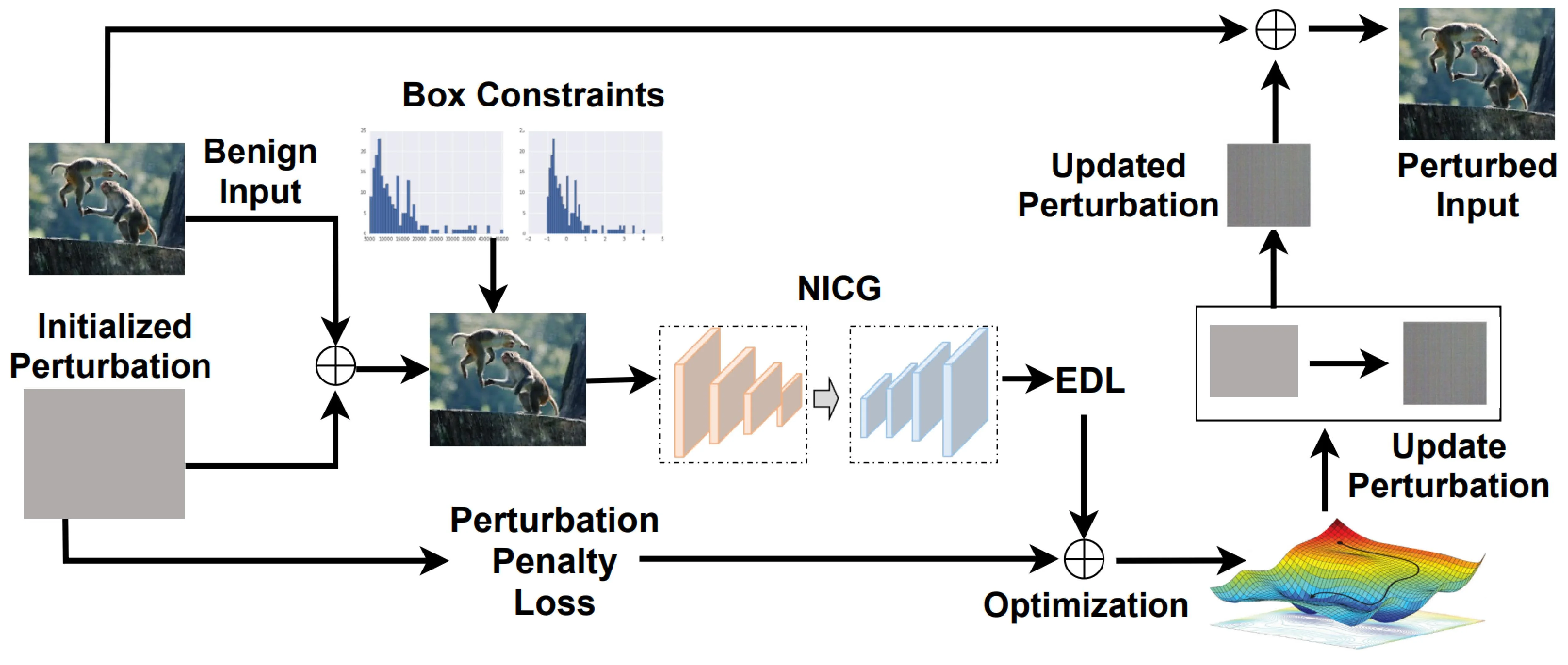
# 主要算法
input:
- a benign input image
- the victim NICG model
- a pre-defined perturbation threshold
- and the maximum iteration number
output
- a adversarial examples
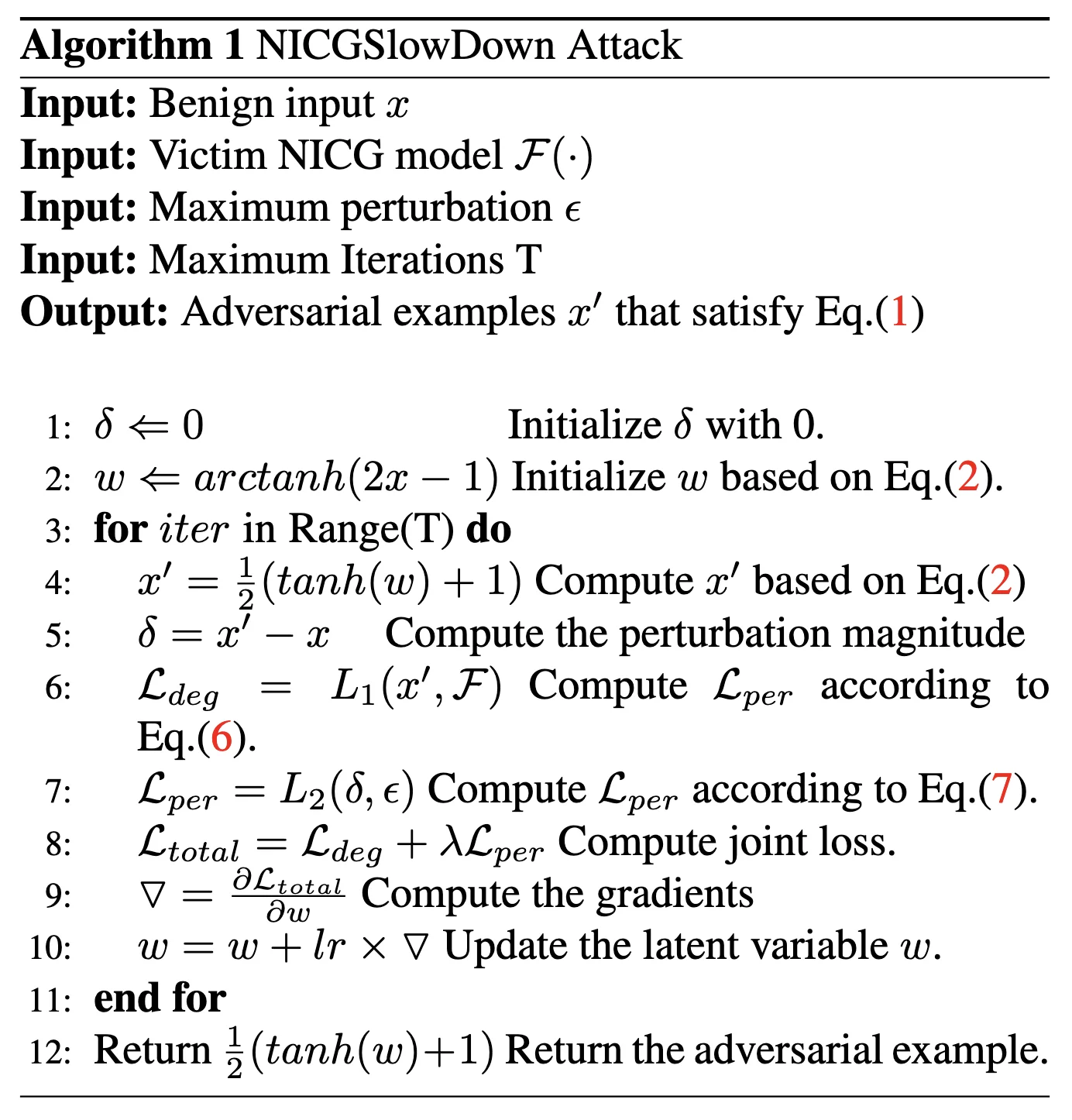
# 转换方法
为了达到 adversarial examples
但是直接优化
因为
# loss1
这个损失函数 (\mathcal{L}_{eos}) 是 EOS(End-of-Sequence)依赖损失,主要用于 序列生成任务(如机器翻译、文本摘要、图像描述生成等),其核心目标是 控制模型生成序列的终止行为,确保模型在合适的位置正确预测序列结束符(如 <EOS>)。
:样本数量(或序列的时间步数)。 :第 个样本或时间步。 :模型在当前时间步对 <EOS>标签的预测概率(即)。 :模型对 其他非 <EOS>标签的预测概率(如词汇表中的词)。 :对非 <EOS>标签按概率分布 的期望(即平均概率)。 - 注意:此处的
是模型在时间步 的预测概率分布(包含 <EOS>和其他词)。
# 直观解释
第一项
:模型预测 <EOS>的概率(即模型认为当前应终止序列的概率)。第二项
:模型对所有 非 <EOS>标签 预测概率的平均值(即模型继续生成词的概率)。差值
: - 若模型对
<EOS>的预测概率 高于其他词的平均概率,则损失增大(惩罚模型提前终止)。 - 若模型对
<EOS>的预测概率 低于其他词的平均概率,则损失减小(鼓励模型在正确位置终止)。
- 若模型对
当
升高时,损失 增大 → 通过梯度下降 迫使 降低。 这样模型会更倾向于继续生成词而非终止。
攻击者希望延长序列(如
SlowDownAttack),而防御方需抑制这种行为。
!!! example "计算示例"
假设一个文本生成任务,词汇表为 `["a", "dog", "<EOS>"]`,某时间步的预测概率分布为:

$$
p_i = [0.2, 0.5, 0.3] \quad \text{(对应 "a", "dog", "<EOS>")}
$$

- **第一项 $l_i^{eos}$**:$p_i^{eos} = 0.3$。
- **第二项 $\mathbb{E}_{k \sim p_i} l_i^k$**:
- 仅对非 `<EOS>` 标签计算期望(即 "a" 和 "dog"):

$$
\mathbb{E}_{k \sim p_i} l_i^k = \frac{0.2 + 0.5}{2} = 0.35
$$
- 或按概率加权平均(需归一化非 `<EOS>` 部分):

$$
\mathbb{E}_{k \sim p_i} l_i^k = \frac{0.2 \times 0.2 + 0.5 \times 0.5}{0.2 + 0.5} = \frac{0.29}{0.7} \approx 0.414
$$

- **单时间步损失**:

$$
l_i^{eos} - \mathbb{E}_{k \sim p_i} l_i^k = 0.3 - 0.414 = -0.114
$$

- 负值表示模型更倾向于继续生成词(需优化)。
# loss2 依赖损失
这个损失函数
:样本数量。 :第 个样本。 :样本 的真实标签(Ground Truth)。 :模型对样本 的预测概率分布(所有类别的概率)。 :模型对 真实标签 的预测概率(即 )。 :模型对 类别 的预测概率(即 )。 :对类别 按概率分布 的期望。
# 直观解释 1
- 第一项
:模型对真实标签的预测概率(置信度)。 - 第二项
:模型对所有类别预测概率的期望(即平均置信度)。 - 差值
:如果模型对真实标签的置信度 高于平均置信度,则损失减小(鼓励模型对正确标签更自信)。如果模型对真实标签的置信度 低于平均置信度,则损失增大(惩罚模型对正确标签的不确定性)。
!!! example "计算示例"
假设一个 3 分类问题,某样本的真实标签为 $o_i=1$,模型预测概率分布为:

$$
p_i = [0.1, 0.7, 0.2]
$$

- **第一项 $l_i^{o_i}$**:$p_i^{o_i} = 0.7$。
- **第二项 $\mathbb{E}_{k \sim p_i} l_i^k$**:

$$
0.1 \times 0.1 + 0.7 \times 0.7 + 0.2 \times 0.2 = 0.54
$$

- **单样本损失**:

$$
l_i^{o_i} - \mathbb{E}_{k \sim p_i} l_i^k = 0.7 - 0.54 = 0.16
$$

- **最终损失**:对所有样本取平均。
# loss3 扰动损失
这个损失函数
:对抗样本与原始样本之间的扰动大小(例如 L2 或 Linf 范数)。 :预设的最大允许扰动阈值。 :范数计算(如 L1、L2 等)。
约束扰动范围
- 当扰动
不超过阈值 时,损失为 0,不进行惩罚。 - 当扰动
超过阈值 时,损失为 ,惩罚超出部分。
# 代码复现 - 准备工作
# 服务器
这次我是在 autodl 上租了一个 3090 进行实验。
autodl 加速:需要使用 hugging face 的时候打开学术资源加速
source /etc/network_turbo
# 数据集
COCO - Common Objects in Context
For more details about training the image caption neural networks, you can follow the tutorial
# caption
这里使用 utils.py中create_input_files这个函数。
from utils import create_input_files

create_input_files(
    dataset='flickr8k',
    karpathy_json_path='/root/autodl-tmp/Capstone/CVPR22_NICGSlowDown/dataset/flickr8k/dataset_flickr8k.json',
    image_folder='/root/autodl-tmp/Capstone/CVPR22_NICGSlowDown/dataset/flickr8k/RAW',
    captions_per_image=5,  # 从名称中可以看出
    min_word_freq=5,       # 从名称中可以看出
    output_folder='/root/autodl-tmp/Capstone/CVPR22_NICGSlowDown/dataset/flickr8k/CAP',
    max_len=100  # 这是默认值,因为没有在名称中体现
)
# 代码复现 - 结果展示
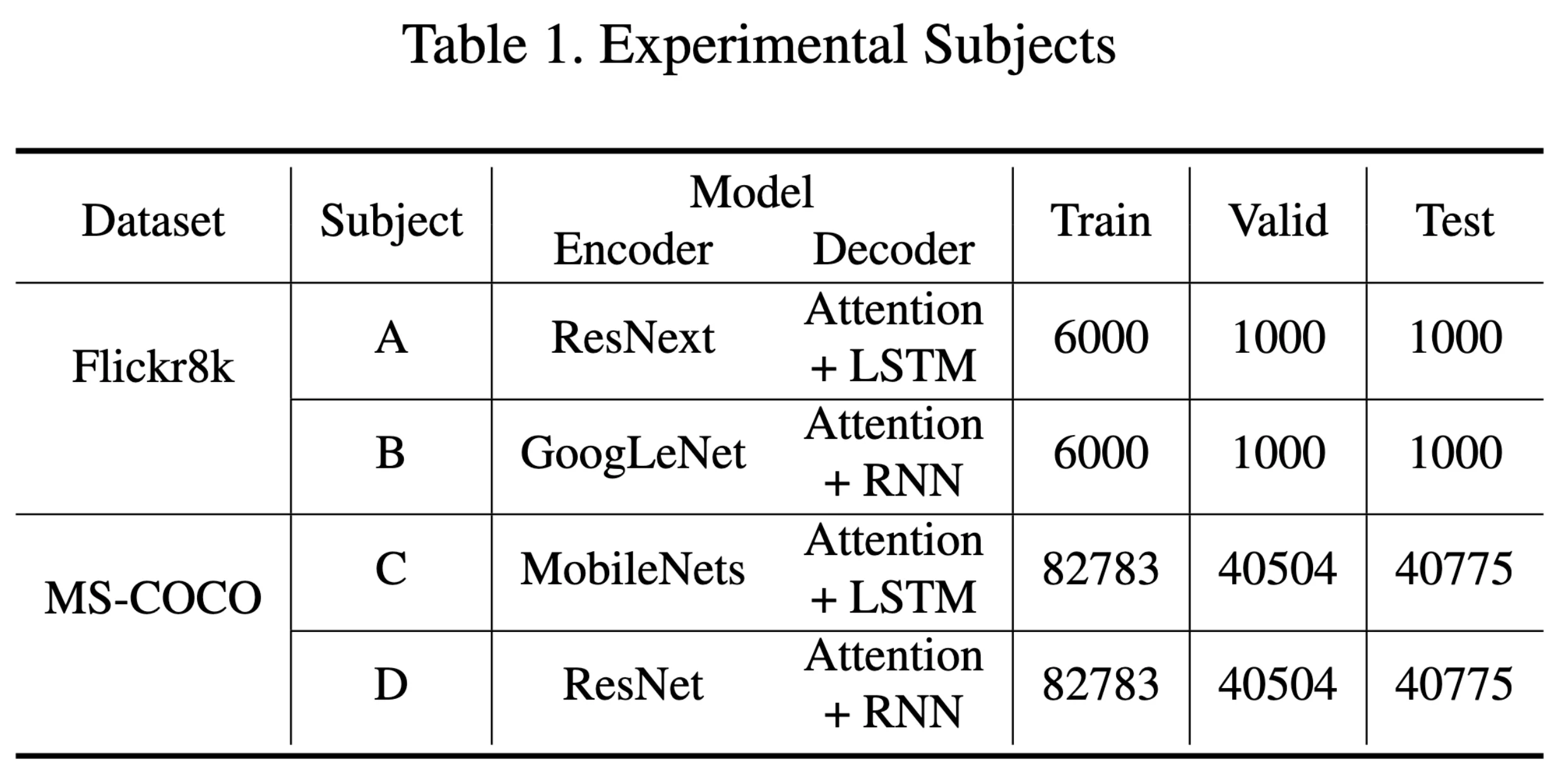
论文中使用了两个数据集、两个 model
这里因为设备限制,也为了节省时间,我只尝试了第一个 dataset Flickr8k
# Metrics - Table2
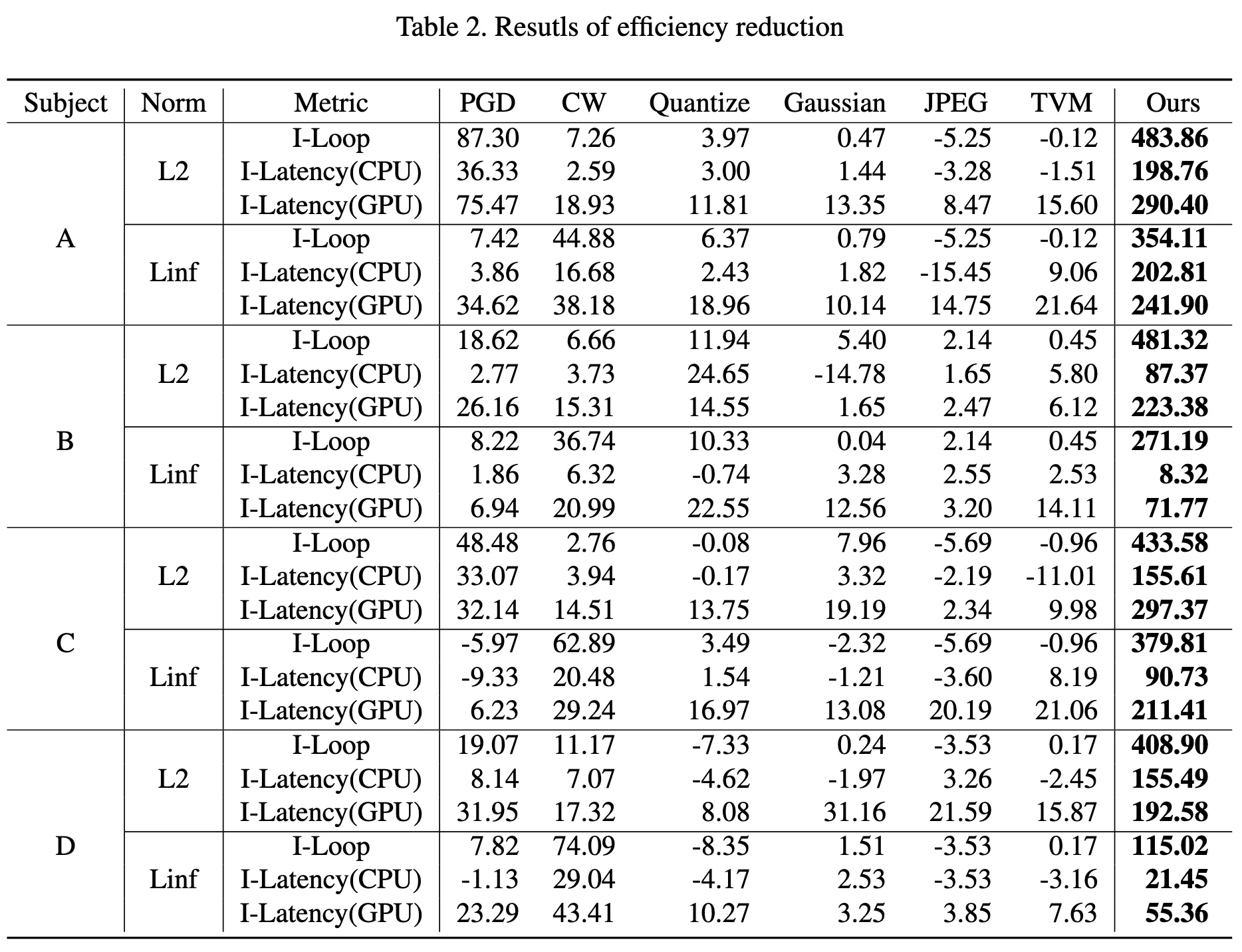
这里用的是论文中提到的 Metrics,即I-loop,I_Latency(CPU,GPU)
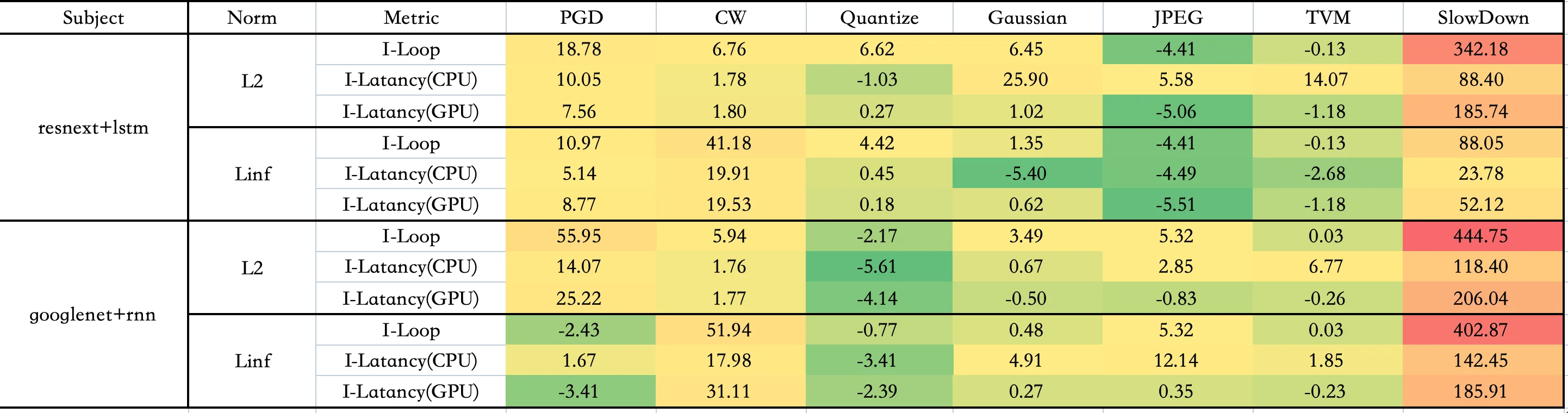
可能由于使用硬件不同,复现效果和原论文数据有一定差别,但是 SlowDown 的效果还是可以体现的
下图是原论文的数据图
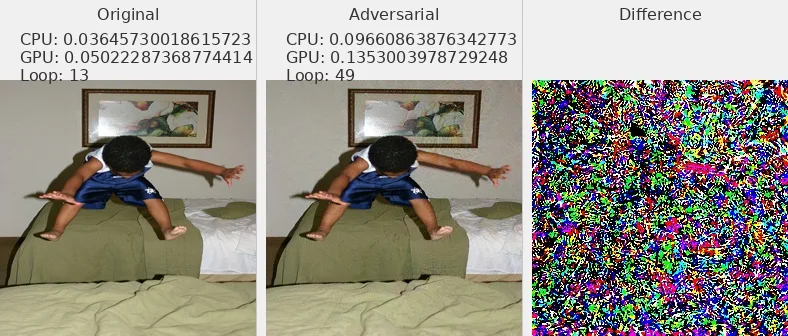
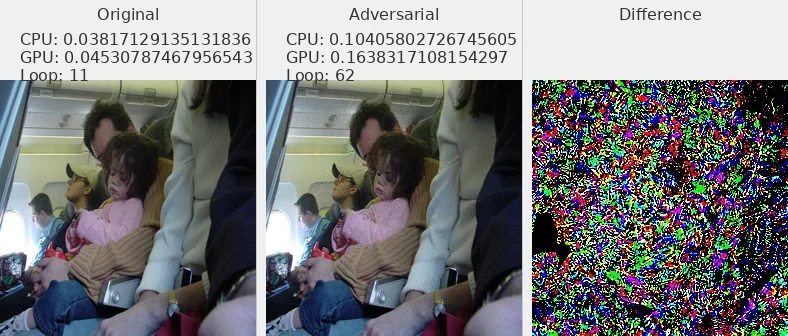
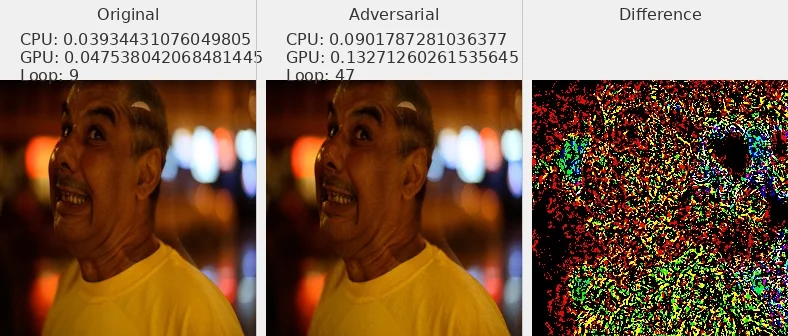
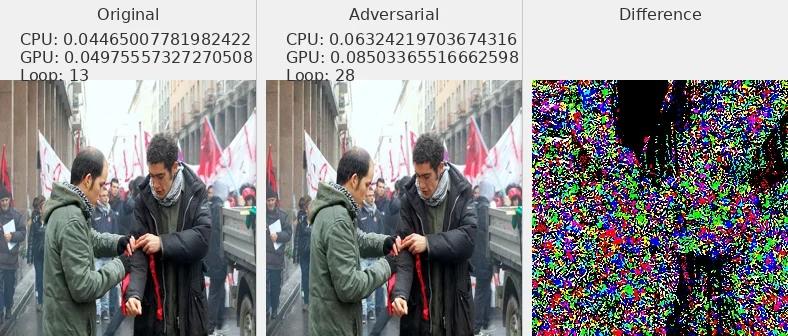
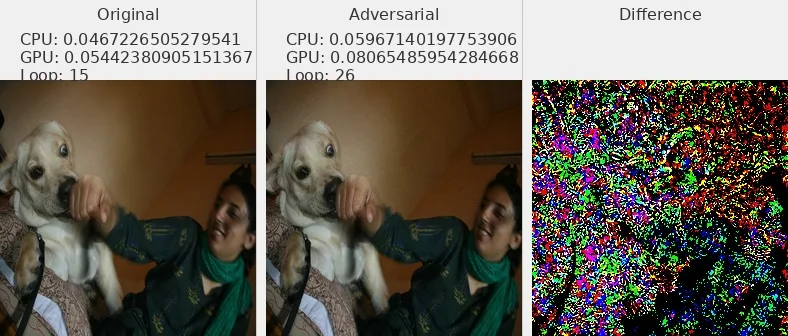
# 图片 - 原文 Fig6
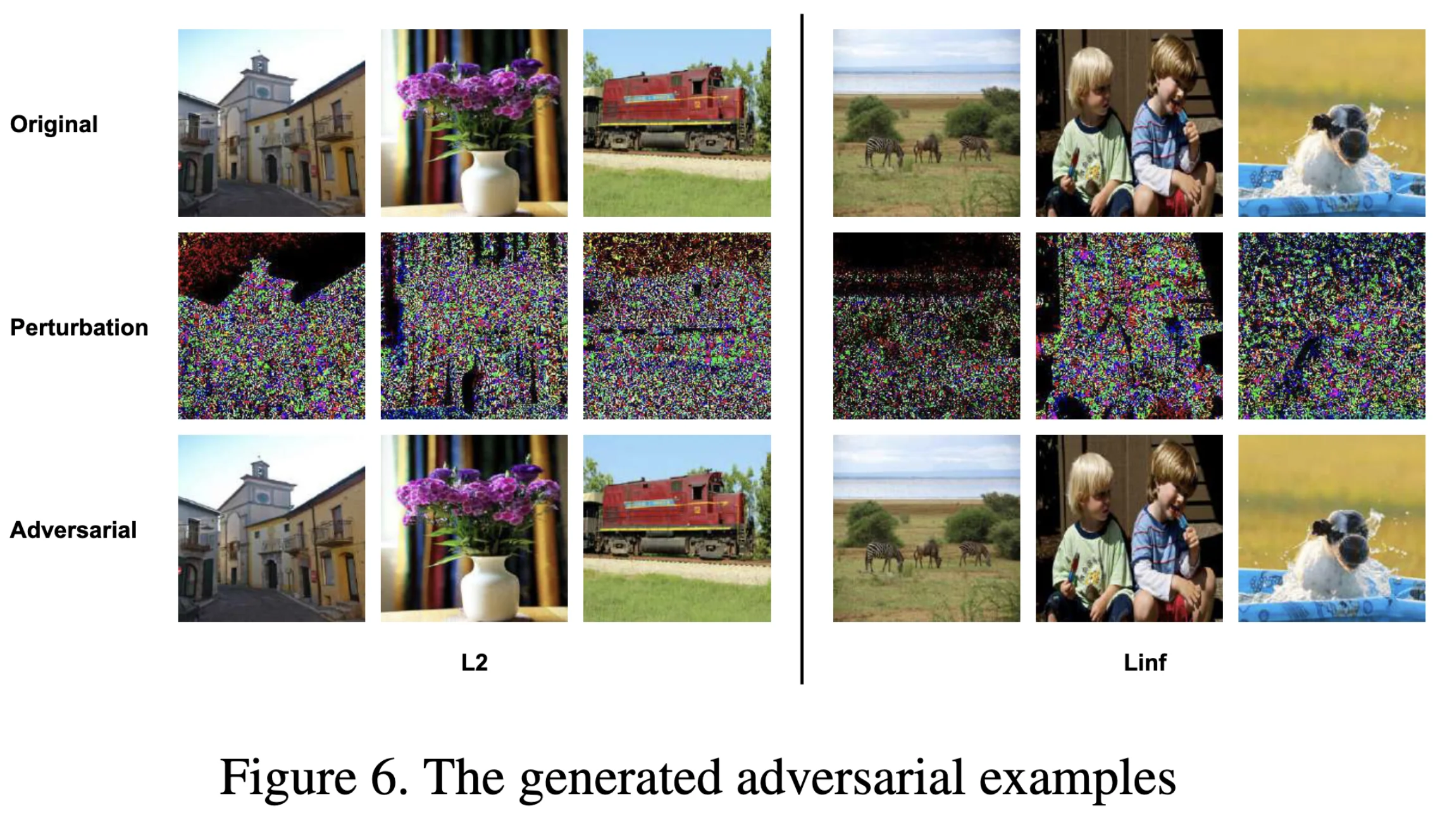
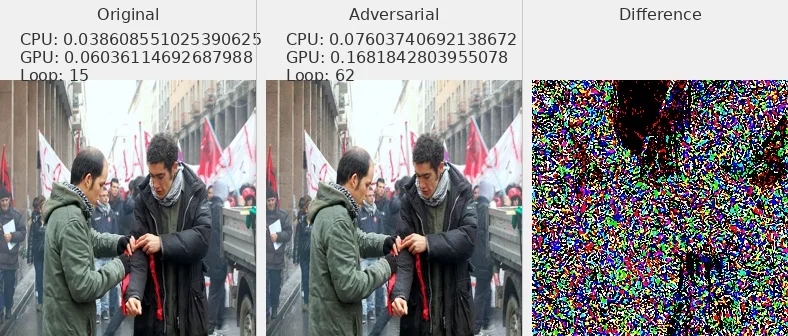
我选择了部分数据集中的图片展示,可以发现对抗攻击样本和原始图片肉眼不可分
L2_flickr8k_googlenet_rnn
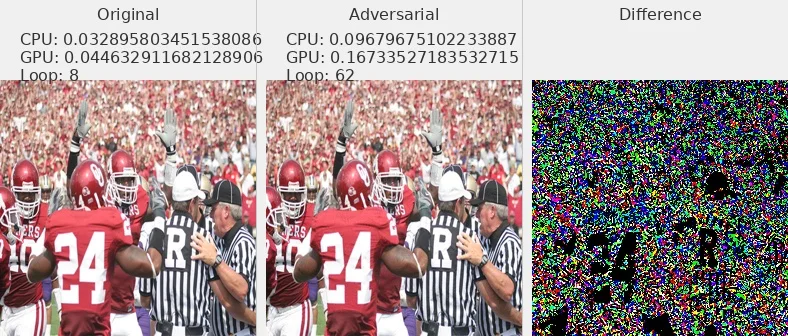
L2_flickr8k_resnext_lstm
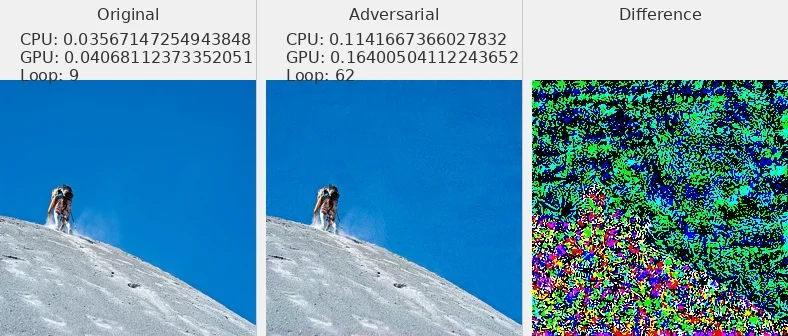
Linf_flickr8k_googlenet_rnn
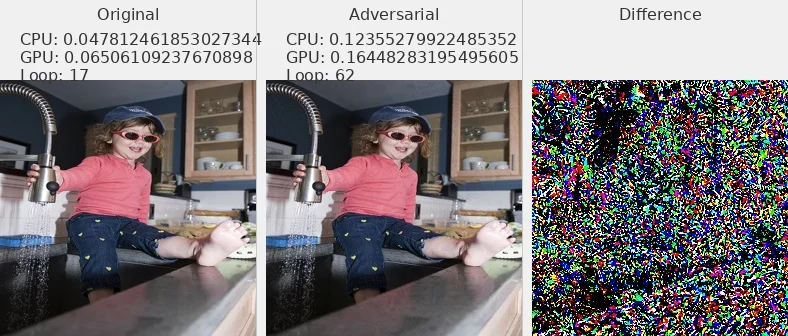
Linf_flickr8k_resnext_lstm
# Distribution
import matplotlib.pyplot as plt
import numpy as np

# 假设 adv_samples 和 ori_samples 已经定义
adv_samples = np.random.normal(0.3, 0.1, 1000)
ori_samples = np.random.normal(0.5, 0.1, 1000)

# 合并数据
all_samples = np.concatenate([adv_samples, ori_samples])

# 计算直方图
bins = np.linspace(0, 1.2, 50)
adv_hist, _ = np.histogram(adv_samples, bins=bins, density=True)
ori_hist, _ = np.histogram(ori_samples, bins=bins, density=True)

# 计算 CDF
adv_cdf = np.cumsum(adv_hist) / np.sum(adv_hist)
ori_cdf = np.cumsum(ori_hist) / np.sum(ori_hist)

# 创建图和两个子图(上面是 PDF,下面是 CDF)
fig, (ax1, ax2) = plt.subplots(2, 1, figsize=(8, 12), sharex=True)  # sharex=True 共享 x 轴

# 绘制 PDF(上面的子图)
ax1.hist(adv_samples, bins=bins, density=True, color='green', alpha=0.5, label='Adv Samples')
ax1.hist(ori_samples, bins=bins, density=True, color='red', alpha=0.5, label='Ori Samples')
ax1.set_ylabel('PDF', color='black')
ax1.tick_params(axis='y', labelcolor='black')
ax1.legend(loc='upper left')
ax1.set_title('Probability Density Function Comparison')

# 绘制 CDF(下面的子图)
ax2.plot(bins[:-1], adv_cdf, color='green', label='Adv CDF', alpha=0.5, linestyle='--')
ax2.plot(bins[:-1], ori_cdf, color='red', label='Ori CDF', alpha=0.5, linestyle='--')
ax2.set_xlabel('Loops')  # 只在下面的子图设置 x 轴标签
ax2.set_ylabel('CDF', color='black')
ax2.set_ylim(1, 0)  # 反转 y 轴,使 CDF 从 1 到 0
ax2.tick_params(axis='y', labelcolor='black')
ax2.legend(loc='upper right')
ax2.set_title('Cumulative Distribution Function Comparison')

# 调整子图间距
plt.subplots_adjust(hspace=0.05)  # 减小子图之间的垂直间距
fig.suptitle('PDF and CDF Comparison: Adversarial vs Original Samples', fontsize=14, y=0.95)

# 显示图像
plt.show()
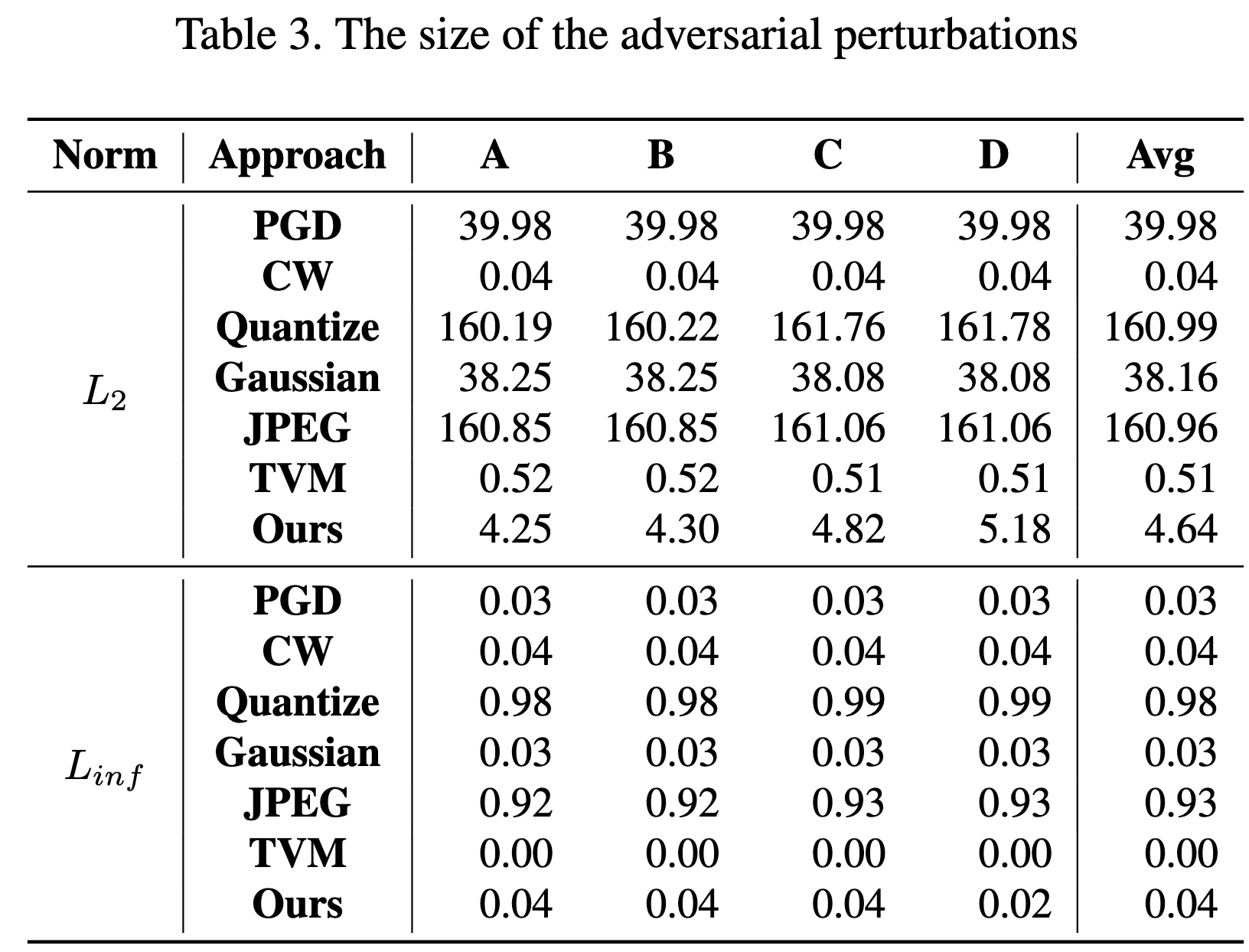
# Norm of Pertubation - Table3
论文中 Table3
主要论证 average perturbation size
复现结果与论文结果较为接近
| Subject | Norm | PGD | CW | Quantize | Gaussian | JPEG | TVM | SlowDown |
|---|---|---|---|---|---|---|---|---|
| A | L2 | 39.97904814 | 0.031572578 | 162.2170346 | 38.00815206 | 162.5883692 | 0.504508379 | 5.232429061 |
| A | Linf | 0.030000001 | 0.034108425 | 0.989821747 | 0.029954669 | 0.944367203 | 0.001945466 | 0.021404715 |
| B | L2 | 39.98188388 | 0.042649064 | 162.2420903 | 38.00864502 | 162.5883692 | 0.504508379 | 4.580114361 |
| B | Linf | 0.029999993 | 0.035503504 | 0.989768272 | 0.029944356 | 0.944367203 | 0.001945466 | 0.040621143 |
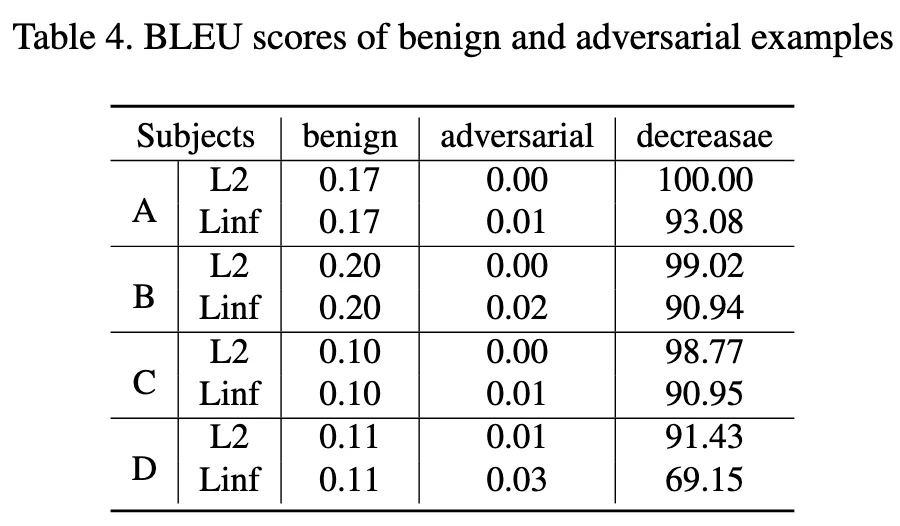
# Bleu 值 - Table4
Subject-B Linf 这个效果不是很好,其他数值较为接近
| Subject | Norm | Ori | Adv | Decrease |
|---|---|---|---|---|
| A | L2 | 0.11 | 0.00 | 100.00 |
| A | Linf | 0.11 | 0.01 | 94.58 |
| B | L2 | 0.11 | 0.01 | 89.12 |
| B | Linf | 0.11 | 0.03 | 68.75 |
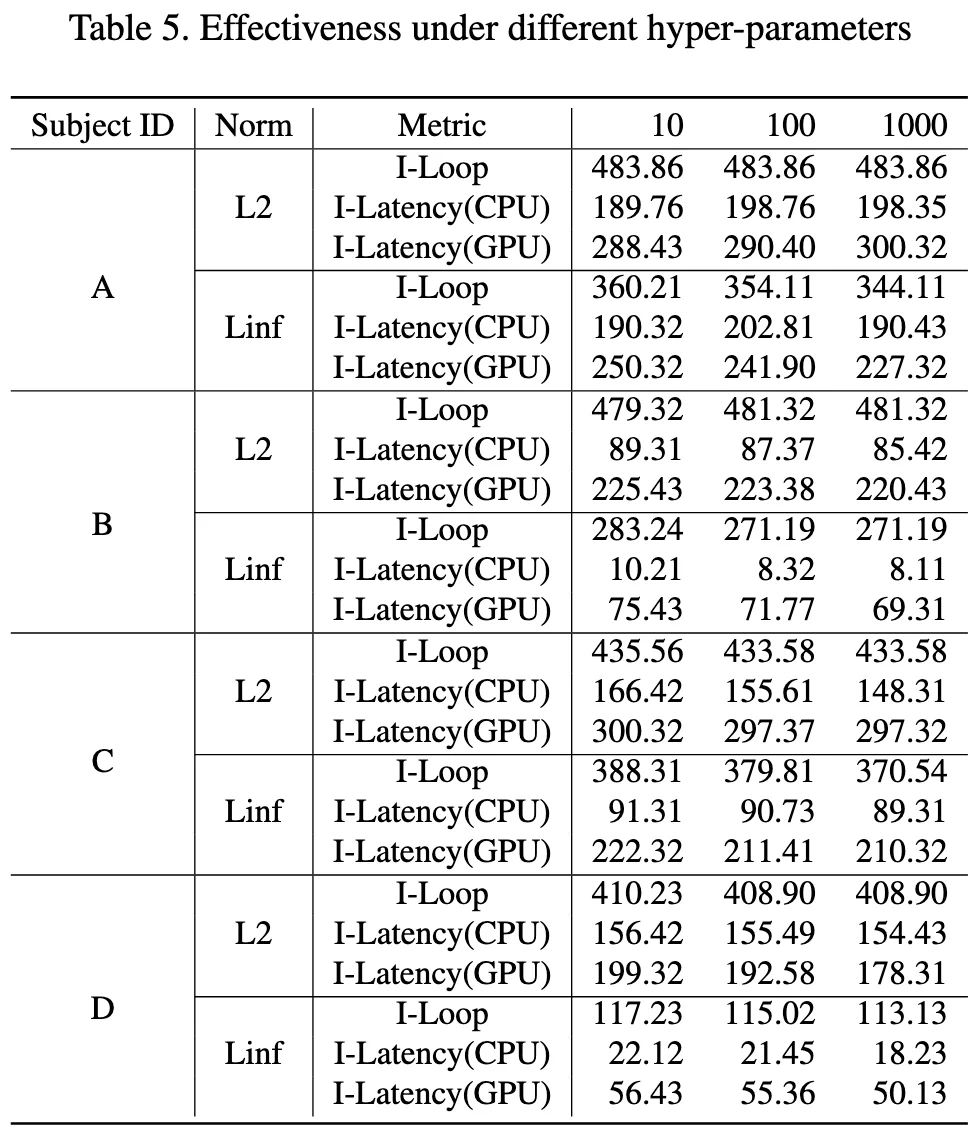
# HyperPerameters - Table5
这里是使用了不同的
在代码slowdown.py中,是初始化的这一句
self.coeff = config['coeff']
在generate_adv.py的 config 中设置coeff这个参数实现
config = {
        'lr': 0.001,
        'beams': 1,
        'coeff': 100,
        'max_len': 60,
        'max_iter': 1000,
        'max_per': MAX_PER_DICT[attack_name]
    }
这里重复实验应该可以得到数据,由于时间原因没有复现这一个表格
# 代码复现 - 问题解决
# uv 安装
uv env --python=3.8.10

uv pip install -r requirements.txt
??? note "requirements.txt" 这里放一下我自己最后环境的requirements.txt,可以参考一下。
        absl-py==2.3.1
    astunparse==1.6.3
    cachetools==5.5.2
    certifi==2025.7.14
    charset-normalizer==3.4.2
    click==8.1.8
    filelock==3.16.1
    flatbuffers==25.2.10
    fsspec==2025.3.0
    gast==0.4.0
    google-auth==2.40.3
    google-auth-oauthlib==1.0.0
    google-pasta==0.2.0
    grpcio==1.70.0
    h5py==3.11.0
    idna==3.10
    imageio==2.35.1
    importlib-metadata==8.5.0
    jax==0.4.13
    jinja2==3.1.6
    joblib==1.4.2
    keras==2.12.0
    lazy-loader==0.4
    libclang==18.1.1
    markdown==3.7
    markupsafe==2.1.5
    ml-dtypes==0.2.0
    mpmath==1.3.0
    networkx==3.1
    nltk==3.9.1
    numpy==1.23.5
    nvidia-cublas-cu12==12.1.3.1
    nvidia-cuda-cupti-cu12==12.1.105
    nvidia-cuda-nvrtc-cu12==12.1.105
    nvidia-cuda-runtime-cu12==12.1.105
    nvidia-cudnn-cu12==9.1.0.70
    nvidia-cufft-cu12==11.0.2.54
    nvidia-curand-cu12==10.3.2.106
    nvidia-cusolver-cu12==11.4.5.107
    nvidia-cusparse-cu12==12.1.0.106
    nvidia-nccl-cu12==2.20.5
    nvidia-nvjitlink-cu12==12.9.86
    nvidia-nvtx-cu12==12.1.105
    oauthlib==3.3.1
    opt-einsum==3.4.0
    packaging==25.0
    pillow==10.4.0
    protobuf==4.25.8
    pyasn1==0.6.1
    pyasn1-modules==0.4.2
    pywavelets==1.4.1
    regex==2024.11.6
    requests==2.32.4
    requests-oauthlib==2.0.0
    rsa==4.9.1
    scikit-image==0.21.0
    scipy==1.10.1
    setuptools==75.3.2
    six==1.17.0
    sympy==1.13.3
    tensorboard==2.12.3
    tensorboard-data-server==0.7.2
    tensorboard-logger==0.1.0
    tensorflow==2.12.0
    tensorflow-estimator==2.12.0
    tensorflow-io-gcs-filesystem==0.34.0
    termcolor==2.4.0
    tifffile==2023.7.10
    torch==2.4.1
    torchvision==0.19.1
    tqdm==4.67.1
    triton==3.0.0
    typing-extensions==4.13.2
    urllib3==2.2.3
    werkzeug==3.0.6
    wheel==0.45.1
    wrapt==1.14.1
    zipp==3.20.2
    ```

当然也可以使用 conda 进行环境管理,但是我这一次为了学习`uv`进行环境管理,所以都使用了`uv`。

### scipy 库
>
> ImportError: cannot import name 'imread' from 'scipy.misc'
python title="utils.py 出错部分" from scipy.misc import imread 可以更改scipy的版本
python pip install scipy==1.2.0 但是我最后采用的解决方案其实是换成了其他库来实现。
python from imageio import imread from PIL import Image import numpy as np
...... img = imread(impaths[i]) if len(img.shape) == 2: img = img[:, :, np.newaxis] img = np.concatenate([img, img, img], axis=2)
img = np.array(Image.fromarray(img).resize((256, 256))) ...... ### 不在一个 device 上
这里的问题是 `allcaps` 在 CPU 上,而 `sort_ind` 在 GPU 上。所以需要放到一个 device 上面
python title="train.py 确定在同一个 device 上面" with torch.no_grad(): # Batches for i, (imgs, caps, caplens, allcaps) in enumerate(val_loader):
    # Move to device, if available
    imgs = imgs.to(device)
    caps = caps.to(device)
    caplens = caplens.to(device)
    allcaps = allcaps.to(device)  # 添加这行,确保 allcaps 也在正确的设备上
## 代码复现 - 代码解读

### 训练与攻击流程

1. **训练阶段**:

    ```bash
    CUDA_VISIBLE_DEVICES=$1 python train.py --config=flickr8k_googlenet_rnn.json
    ```

    `train.py`

    - 调用时机:项目开始,用于训练模型
    - 依赖:`config/*.json`, `utils.py`, `datasets.py`, `src/*`
    - 输出:模型权重如`BEST_flickr8k_googlenet_rnn.pth.tar`

2. **对抗样本生成阶段**:
    按顺序执行不同的攻击方法,每种攻击都测试 L2 和 Linf 两种范数:

    `generate_adv.py`

    - 调用时机:模型训练完成后
    - 依赖:训练好的模型权重,`utils.py`(攻击方法)
    - 输出:对抗样本文件(保存在 `adv/` 目录)

3. **测试与分析阶段**:

    `test_latency.py`

    - 调用时机:对抗样本生成后
    - 依赖:生成的对抗样本,训练好的模型
    - 输出:延迟测试结果(保存在 `latency/` 目录)

    `loss_impact.py`

    - 调用时机:最后阶段
    - 依赖:训练好的模型
    - 输出:损失函数研究结果(保存在 `study/` 目录)

### metrics 测量方法

主要需要测量三个主要的 metrics

对于每个样本,记录了以下信息:

- `device_res[0]`: CUDA 设备上的执行时间(运行 5 次的总时间)
- `device_res[1]`: CPU 设备上的执行时间(运行 1 次的时间)
- `device_res[2]`: 预测的序列长度(`pred_len`)

其中代码里面计算的时候 gpu 运行 5 次的总时长,cpu 运行 1 次的总时长

for device in DEVICE_LIST:
    encoder = encoder.to(device).eval()
    decoder = decoder.to(device).eval()
    img = img.to(device)
    max_iter = ITER_DICT[device]
    t1 = time.time()
    for _ in range(max_iter):
        pred_len = prediction_len_batch(img, encoder, decoder, word_map, max_length, device)
    t2 = time.time()
    device_res.append(t2 - t1)
    device_res.append(pred_len[0])
    res.append(device_res)

def prediction_len_batch(imgs, encoder, decoder, word_map, max_length, device):
    ...

return [get_seq_len(seq, word_map) for seq in seqs]

对于每个序列,通过 `get_seq_len` 计算从开始到 `<end>` 标记之间的词数

而`prediction_len_batch`返回的是一个 batch 当中每个样本的预测序列长度。

在实验中,`batch=1`,所以`pred_len[0]`是序列的长度

### 参数说明

1. **task 参数**:选择要测试的模型:

   - 0: coco_mobilenet_rnn
   - 1: coco_resnet_lstm
   - 2: flickr8k_googlenet_rnn
   - 3: flickr8k_resnext_lstm

2. **attack 参数**:

   - 0: SlowDownAttack
   - 1: PGDAttack
   - 2: CWAttack
   - 3: TVMAttack
   - 4: GaussianAttack
   - 5: JPEGAttack
   - 6: Quantize

3. **norm 参数**:

   - 0: L2 范数
   - 1: Linf 范数(无穷范数)

### 代码写法

这个库当中的 attack 方法使用了继承的方法,即先谢了一个 attack 的基类,定义了几种 attack 的基础方法。

**然后再用继承的方法,写出了不同的 attack 方法。**

### `train.py` - 训练出 NICG model

1. **初始化阶段**:
   - 加载配置文件(模型参数、训练参数等)
   - 初始化编码器(Encoder)和解码器(Decoder)
   - 设置优化器和损失函数
   - 加载数据集和词表映射

2. **训练循环**:
   - 每个 epoch 包含训练和验证两个阶段
   - 训练阶段:调用 `train()` 函数进行模型训练
   - 验证阶段:调用 `validate()` 函数评估模型性能
   - 根据验证结果保存检查点,更新最佳模型

3. **前向传播**:

   ```python
   # 编码器处理图像
   imgs = encoder(imgs)  # 输出:[batch_size, enc_image_size, enc_image_size, encoder_dim]

   # 解码器生成描述
   scores, caps_sorted, decode_lengths, alphas, sort_ind = decoder(imgs, caps, caplens)
   ```

4. **损失计算**:

   ```python
   # 交叉熵损失
   loss = criterion(scores, targets)

   # 注意力正则化损失(双重随机注意力)
   loss += alpha_c * ((1. - alphas.sum(dim=1)) ** 2).mean()
   ```

   - `alpha_c`: 注意力正则化系数
   - `alphas`: 注意力权重 [batch_size, num_pixels]

5. **性能指标**:
   - Top-5 准确率:预测的前 5 个最可能的词中包含正确词的比例
   - BLEU-4 分数:评估生成的描述与参考描述的相似度

训练优化策略

1. **学习率调整**:
   - 当验证性能停止提升时,降低学习率
   - 每 8 个 epoch 无改善,学习率乘以 0.8

2. **梯度裁剪**:

   ```python
   if grad_clip is not None:
       clip_gradient(decoder_optimizer, grad_clip)
   ```

   - 防止梯度爆炸
   - 将梯度值限制在一定范围内

3. **早停策略**:

   ```python
   if epochs_since_improvement == 20:
       break
   ```

   - 当验证性能连续 20 个 epoch 没有提升时停止训练

beam search

在验证和测试阶段,使用束搜索生成最终的图像描述:
python def caption_image_beam_search(encoder, decoder, image, word_map, beam_size=3): # 维护 k 个最可能的序列 k = beam_size # 计算每个时间步的 top-k 概率 # 选择得分最高的序列作为最终输出 ### utils.py - 工具函数
`utils.py`: 工具函数文件

- `create_input_files`: 处理原始数据集,创建训练所需的输入文件
- `caption_image_beam_search`: 使用束搜索生成图像描述
- `caption_image_batch`: 批量生成图像描述
- 包含各种辅助函数(损失计算、优化器调整、准确率计算等)

### `generate_adv.py` - 生成对抗样本

这个文件就是使用不同的攻击方法,对我们训练好的 NICG 模型,生成对抗样本对。

- 生成对抗样本
- 支持多种攻击方法和规范(L2 和 Linf 范数)
- 保存对抗样本结果

1. **关键参数**:

    ```python
    ADV_NUM = 1000  # 生成对抗样本的数量
    BATCH = 20      # 批处理大小
    CAP_PER_IMG = 5 # 每张图片的描述数量
    ```

2. **攻击配置**:

    ```python
    config = {
        'lr': 0.001,        # 优化器学习率
        'beams': 1,         # 束搜索大小
        'coeff': 100,       # 攻击系数
        'max_len': 60,      # 最大序列长度
        'max_iter': 1000,   # 最大迭代次数
        'max_per': MAX_PER_DICT[attack_name]  # 最大扰动范围
    }
    ```

3. **支持的攻击方法**(从 utils.py):

    ```python
    ATTACK_METHOD = [
        SlowDownAttack,   # 减速攻击
        PGDAttack,        # 投影梯度下降攻击
        CWAttack,         # Carlini & Wagner 攻击
        TVMAttack,        # 总变分最小化攻击
        GaussianAttack,   # 高斯噪声攻击
        JPEGAttack,       # JPEG 压缩攻击
        Quantize,         # 量化攻击
    ]
    ```

4. **工作流程**:
   - 加载预训练模型和数据集
   - 根据指定的攻击类型和范数创建攻击器
   - 批量生成对抗样本
   - 保存原始图像和对抗样本对

### `test_latency.py` - 测试推理速度

这个文件就是测试我们生成的对抗样本对,对模型推理速度的影响。

- 测试模型在不同设备(CPU/GPU)上的延迟
- 比较原始图像和对抗样本的处理时间
- 评估攻击对模型推理速度的影响

1. **测试配置**:

    ```python
    DEVICE_LIST = ['cuda', 'cpu']  # 测试设备
    ITER_DICT = {
        'cuda': 5,  # GPU 上运行 5 次取平均
        'cpu': 1    # CPU 上运行 1 次
    }
    ```

2. **效率测试流程**:

    ```python
    def test_efficiency(imgs, encoder, decoder, word_map, max_length):
        # 对每张图片
        for img in imgs:
            # 在每个设备上测试
            for device in DEVICE_LIST:
                # 多次运行取平均
                for _ in range(ITER_DICT[device]):
                    # 测量推理时间
                    pred_len = prediction_len_batch(...)
    ```

3. **结果保存**:

    ```python
    torch.save(
        [ori_efficiency, adv_efficiency],
        os.path.join('latency', f'{attack_type}_{attack_name}_{task_name}.latency')
    )
    ```

### `loss_impact.py` - 参数影响分析

对应论文的 Table5

1. **主要功能**:
   - 研究不同损失函数对对抗攻击效果的影响
   - 对比分析不同损失类型下的攻击结果
   - 生成用于研究的对抗样本

2. **实验设置**:

    ```python
    # 基本参数
    ADV_NUM = 1000  # 实验样本数量
    BATCH = 20      # 批处理大小

    # 攻击配置
    config = {
        'lr': 0.001,        # 学习率
        'beams': 1,         # 束搜索大小
        'coeff': 100,       # 攻击系数
        'max_len': 60,      # 最大序列长度
        'max_iter': 1000,   # 最大迭代次数
        'max_per': MAX_PER_DICT[attack_name]  # 最大扰动范围
    }
    ```

3. **实验维度**:
   - **范数类型**(attack_norm):
     - 0: L2 范数
     - 1: Linf 范数(无穷范数)

   - **损失类型**(loss_type):
     - 0: 原始损失函数
     - 1: 改进的损失函数
   -

### `slowdown.py` - 攻击函数
python while len(complete_seqs) < batch_size: # 1. Embed previous word embeddings = decoder.embedding(k_prev_words.to(device)).squeeze(1) # (batch_size, embed_dim)
# 2. Attention 计算
awe, alpha = decoder.attention(encoder_out, h)  # (batch_size, encoder_dim), (batch_size, num_pixels)

# 3. Gating mechanism
gate = decoder.sigmoid(decoder.f_beta(h))  # (batch_size, encoder_dim)
awe = gate * awe  # 加权注意力特征

# 4. LSTM/GRU 解码
if type(decoder.decode_step) == torch.nn.LSTMCell:
    h, c = decoder.decode_step(torch.cat([embeddings, awe], dim=1), (h, c))
elif type(decoder.decode_step) == torch.nn.GRUCell:
    h = decoder.decode_step(torch.cat([embeddings, awe], dim=1), h)

# 5. 计算下一个词的概率分布
scores = decoder.fc(h)  # (batch_size, vocab_size)
scores = F.softmax(scores, dim=-1)
next_word_probs, next_word_inds = scores.max(1)  # 取概率最高的词

# 6. 强制计算 <end> token 的概率(用于对抗攻击)
next_word_probs = \
    scores[:, word_map['<end>']] + \
    (next_word_inds != word_map['<end>']) * next_word_probs

# 7. 更新序列和分数
next_word_inds = next_word_inds.cpu()
seqs = torch.cat([seqs, next_word_inds.unsqueeze(1)], dim=1)  # (batch_size, step+1)
seq_scores = torch.cat([seq_scores, next_word_probs.unsqueeze(1)], dim=1)

# 8. 检查是否生成 <end> token
incomplete_inds = [ind for ind, next_word in enumerate(next_word_inds) if next_word != word_map['<end>']]
complete_inds = set(range(batch_size)) - set(incomplete_inds)
complete_seqs.update(complete_inds)

# 9. 更新输入词
k_prev_words = next_word_inds.unsqueeze(1)

# 10. 检查是否超过最大长度
if step > max_length:
    break
step += 1
1. **Embedding 层**:将上一个词 `k_prev_words` 转换为词向量 `embeddings`。
2. **注意力机制**:

   - `decoder.attention(encoder_out, h)` 计算当前隐藏状态 `h` 对图像特征的注意力权重 `alpha`。
   - `awe` 是加权后的上下文向量(Attended Visual Features)。

3. **Gating 机制**:

   - 使用 `decoder.f_beta(h)` 和 `sigmoid` 计算门控值 `gate`,调整 `awe` 的权重。

4. **LSTM/GRU 解码**:

   - 输入:`[embeddings, awe]`(词向量 + 注意力特征)。
   - 输出:更新隐藏状态 `h`(和 `c`,如果是 LSTM)。

5. **Softmax 计算**:

   - `decoder.fc(h)` 输出词表概率分布 `scores`。
   - `next_word_probs` 是最高概率词的分数。

6. **强制计算 `<end>` 概率**:

   - 如果当前词不是 `<end>`,则 `next_word_probs` 保持不变;否则,使用 `<end>` 的概率。
   - 这是对抗攻击的关键,因为攻击目标是让模型在 `<end>` 处停留更久(增加推理时间)。

7. **更新序列和分数**:

   - `seqs` 存储生成的序列。
   - `seq_scores` 存储每个词的概率分数(用于计算对抗损失)。

8. **终止条件**:

   - 如果生成 `<end>` 或超过 `max_length`,则停止解码。

### `distribution.py`

- **输入**:从`latency/`目录加载不同攻击方法(`L2`和`Linf`)的延迟测试结果(`.latency`文件)。
- **处理**:将原始(`ori_res`)和对抗(`adv_res`)的延迟数据合并,并重新组织为结构化格式。
- **输出**:保存为 CSV 文件到`dist/`目录,文件命名格式为`____dist____{task_name}_{attack_name}.csv`。

=== "数据加载"
    ```python
    latency_res = torch.load(latency_file)  # 加载.latency 文件
    ori_res, adv_res = latency_res         # 解包原始和对抗结果
    ```

    - 假设`ori_res`和`adv_res`是列表,每个元素代表一个样本的延迟测量值(例如不同层的推理时间)。

=== "数据合并"

    ```python
    for ori, adv in zip(ori_res, adv_res):
       tmp = np.array(ori + adv).reshape([1, -1])  # 将 ori 和 adv 拼接为一行
       res.append(tmp)
    res = np.concatenate(res, axis=0)              # 堆叠所有样本
    ```

    - 每个样本的原始和对抗数据被拼接为一行(例如`ori`有 3 个值,`adv`有 4 个值,则合并后为 7 列)。

=== "输出示例"

    - 如果`ori_res[0] = [t1, t2, t3]`,`adv_res[0] = [t4, t5, t6, t7]`,则合并后的一行为`[t1, t2, t3, t4, t5, t6, t7]`。

### `collect_latency.py`

根据原始数据计算 metrics
text 0.15, 0.12, 0.18, 0.20, 0.10, 0.05, 0.30 # 循环延迟平均增加(攻击类型 1-6,最后一列是类型 0) 0.10, 0.08, 0.12, 0.15, 0.05, 0.02, 0.25 # CPU 延迟平均增加 0.20, 0.15, 0.25, 0.30, 0.12, 0.08, 0.40 # GPU 延迟平均增加 0.50, 0.40, 0.60, 0.70, 0.30, 0.20, 0.80 # 循环延迟最大增加 0.30, 0.25, 0.35, 0.40, 0.20, 0.15, 0.50 # CPU 延迟最大增加 0.60, 0.50, 0.70, 0.80, 0.40, 0.30, 0.90 # GPU 延迟最大增加 - 每行含义: 1-3 行:平均延迟增加(循环、CPU、GPU)。 4-6 行:最大延迟增加(循环、CPU、GPU)。 - 每列含义: 前 6 列:攻击类型 1-6 的结果,最后一列:攻击类型 0 的结果。
### `acc.py`

计算 bleu 值

### `pertubation.py`

计算 Table-3,也就是算 average perturbation size

输出到`PerRes`目录

1. 每个模型的单独结果文件 (`task_name + '_' + attack_name + '.csv'`):

    ```python
    final_res = np.concatenate([delta_list[:, 1:], delta_list[:, 0:1]], axis=1)
    ```

    这个文件的格式是:

    - 每行代表一个样本
    - 有 7 列,对应 7 种攻击方法的扰动值
    - 特别注意:列的顺序是 [1,2,3,4,5,6,0],把第 0 种攻击方法的结果放到最后一列

2. 最终的平均结果文件 (`average.csv`):

    ```python
    all_res = np.concatenate(all_res, axis=1)
    ```

    这个文件包含了:

    - 每个元素是 `(final_res < MAX_PER_DICT[attack_name]).mean(0)`
    - 表示扰动小于阈值的样本比例
    - 对每个模型和每种攻击类型都有一个这样的统计值

### 几个 loss 的实现

#### Pertubation penalty

$$
\mathcal{L}_{per}=\begin{cases}\quad0;&\mathrm{~if~}\delta\leq\epsilon\\||\delta-\epsilon||;&\mathrm{~otherwise}&&\end{cases}
$$

这个损失函数在 `SlowDownAttack` 类中实现:
python def compute_per(self, adv_imgs, ori_imgs): """计算扰动大小""" if self.attack_norm == L2: current_L = self.mse_Loss( self.flatten(adv_imgs), self.flatten(ori_imgs)).sum(dim=1) elif self.attack_norm == Linf: current_L = (self.flatten(adv_imgs) - self.flatten(ori_imgs)).max(1)[1] else: raise NotImplementedError return current_L
然后在 `run_attack` 和 `run_diff_loss` 方法中使用:

current_per = self.compute_per(adv_images, ori_img)
per_loss = self.relu(current_per - self.max_per) # 这里实现了分段函数 per_loss = per_loss.sum() 这里的实现对应公式:
- `current_per` 计算 \delta (扰动大小)
- `self.max_per` 对应 \epsilon (扰动阈值)
- `self.relu(current_per - self.max_per)` 实现了分段函数:
  - 当 \delta \leq \epsilon 时,输出 0
  - 当 \delta > \epsilon 时,输出 ||\delta-\epsilon||

#### 依赖损失

$$
\mathcal{L}_{dep} =\frac 1n \sum^n_{i=1} \{l_i ^{o_i} - \mathbb{E}_{k \sim p_i} l_i ^k\}
$$

这个在 `prediction_batch` 函数中实现:

def prediction_batch(imgs, encoder, decoder, word_map, max_length, device):
    # ...
    scores = decoder.fc(h)  # (s, vocab_size)
    scores = F.softmax(scores, dim=-1)  # 计算概率分布
    next_word_probs, next_word_inds = scores.max(1)  # 获取最大概率的词

# 计算每个位置的得分
seq_scores = torch.cat([seq_scores, next_word_probs.unsqueeze(1)], dim=1)
这个损失函数的实现体现在:

- `scores = F.softmax(scores, dim=-1)` 计算每个位置的概率分布 p_i
- `next_word_probs, next_word_inds = scores.max(1)` 获取最可能的词 o_i 及其概率 l_i^{o_i}
- 通过 softmax 计算得到的 scores 包含了 \mathbb{E}_{k \sim p_i} l_i^k

在 `SlowDownAttack` 类中,这两个损失被组合使用:
python def run_attack(self, x): # ... adv_loss = self.compute_adv_loss(adv_images) # 包含依赖损失 current_per = self.compute_per(adv_images, ori_img) # 扰动损失 per_loss = self.relu(current_per - self.max_per) per_loss = per_loss.sum()
loss = adv_loss + self.coeff * per_loss  # 组合损失
整个攻击过程中:

1. \mathcal{L}_{per} 确保生成的对抗样本扰动不会太大,保持在可接受范围内
2. \mathcal{L}_{dep} 通过影响模型在每个位置的预测概率分布,来实现对序列生成过程的干扰
3. 两个损失通过系数 `self.coeff` 进行平衡,共同指导对抗样本的生成

这种实现方式使得攻击既能保持对抗样本的视觉质量(通过扰动损失约束),又能有效地影响模型的预测行为(通过依赖损失)。这正是论文中描述的降速攻击的核心思想。

### EOS 依赖损失

在 `slowdown.py` 和`captionAPI.py`当中有所体现
python title="compute_adv_loss" def compute_adv_loss(self, adv_imgs): seqs, seq_scores = prediction_batch_target_end( adv_imgs, self.encoder, self.decoder, self.word_map, self.max_len, self.device ) loss = self.bce_loss(seq_scores, torch.zeros_like(seq_scores)) return loss.mean(1).sum() - 作用:计算对抗样本的损失,目标是让模型生成更长的序列(延迟 <EOS> 的出现)。 - 关键步骤: 1. prediction_batch_target_end:生成对抗样本的序列和分数 seq_scores。 2. bce_loss:二元交叉熵损失,将 seq_scores 与全零张量比较,强制降低 <EOS> 的概率。
next_word_probs = \
    scores[:, word_map['<end>']] + \
    (next_word_inds != word_map['<end>']) * next_word_probs
设计意图:
- 如果当前预测词不是
<EOS>,则next_word_probs保留最高概率词的分数。 - 如果当前预测词是
<EOS>,则next_word_probs直接使用<EOS>的概率。 - 这样设计的目的是让损失函数能够 显式区分模型是否预测了
<EOS>。
- 如果当前预测词不是
二元交叉熵 (BCE Loss):
- 其中
p_i^{eos}是<EOS>的概率(来自seq_scores)。 - 最小化该损失等价于 强制
p_i^{eos}趋近于 0(即延迟终止)。
原始问题中的
在代码中 并未直接实现此公式,但通过以下方式间接实现类似效果:
prediction_batch_target_end中的next_word_probs计算已经隐含了<EOS>与其他词概率的对比。bce_loss通过强制<EOS>概率降低,实现了类似的目标(抑制 <EOS>的出现)。
# 代码中的具体实现链路
- 输入对抗样本:
adv_imgs(通过扰动生成的图像)。 - 生成序列和分数:
- 调用
prediction_batch_target_end,返回seq_scores(包含每个时间步的<EOS>调整概率)。
- 调用
- 计算损失:
- 使用
bce_loss将seq_scores与零张量比较,惩罚高<EOS>概率。
- 使用
- 优化对抗样本:
- 在
run_attack中,联合扰动约束损失 (per_loss) 和对抗损失 (adv_loss) 更新对抗样本。
- 在
- 当前代码:通过
bce_loss隐式实现的目标(抑制 <EOS>)。 - 关键函数:
prediction_batch_target_end中的next_word_probs计算是核心。 - 设计意图:攻击者希望模型生成更长序列,因此需降低
<EOS>概率,增加计算时间。